Trigger a task. Watch it run.
This guide takes you from your invite to your first run: keys, secrets, tasks deployed to Launchpad or run on your own workers, and their output files.
import { TaskevoSdk } from "taskevo-sdk";

const tr = new TaskevoSdk({
  baseUrl: "https://www.taskevo.net",
  apiKey: process.env.TASKEVO_API_KEY, // a Trigger key
});

const { id } = await tr.trigger("scrape:pdf", {
  url: "https://example.com/invoices/INV-2041.pdf"
});- 0%Run queued (hosted)
- 0%Claimed by host-taskevo (Launchpad v3, micro)
- 10%Starting
- 30%Reading PDF
- 80%Saving files
- 90%Saved 4 output files (6.1 KB)
- 100%Run completed
{
  "url": "https://example.com/invoices/INV-2041.pdf",
  "title": "Invoice INV-2041",
  "documentType": "invoice",
  "fields": 3,
  "tables": 1
}- document.json
- summary.md
- fields.csv
- tables/table-01.csv
Taskevo runs your background work. Your app sends a task id and a JSON payload; Taskevo queues the run, executes it, and shows its progress, logs, output and files in the dashboard.
Who it's for. Teams with work that shouldn't block a request: reading PDFs, sending email, rendering reports, syncing data. Every account gets a workspace, and an administrator invites people into it.
Where tasks run. On Launchpad, where you deploy the code and Taskevo builds it and runs each run in its own sandbox. Or on your own machines, with a worker that claims queued runs over HTTPS.
How you use it. The dashboard for keys, secrets, runs and deployments. taskevo-sdk in your code to trigger runs and to write workers. taskevo-cli to scaffold, test and deploy task projects.
What you need. An invite from your administrator, and for development Node.js 20.12 or newer (22 recommended) with npm 7+. In this guide https://www.taskevo.net stands for your Taskevo address.
Everything in this guide

Get started
Sign up with your invite, sign in, and learn the dashboard. Administrators also invite the rest of the team here.
Create your account
Sign-up is by invite only. Each invite works once, for one email address, and each new account gets its own workspace. No invite yet? Ask an administrator to send one (see Invite people).
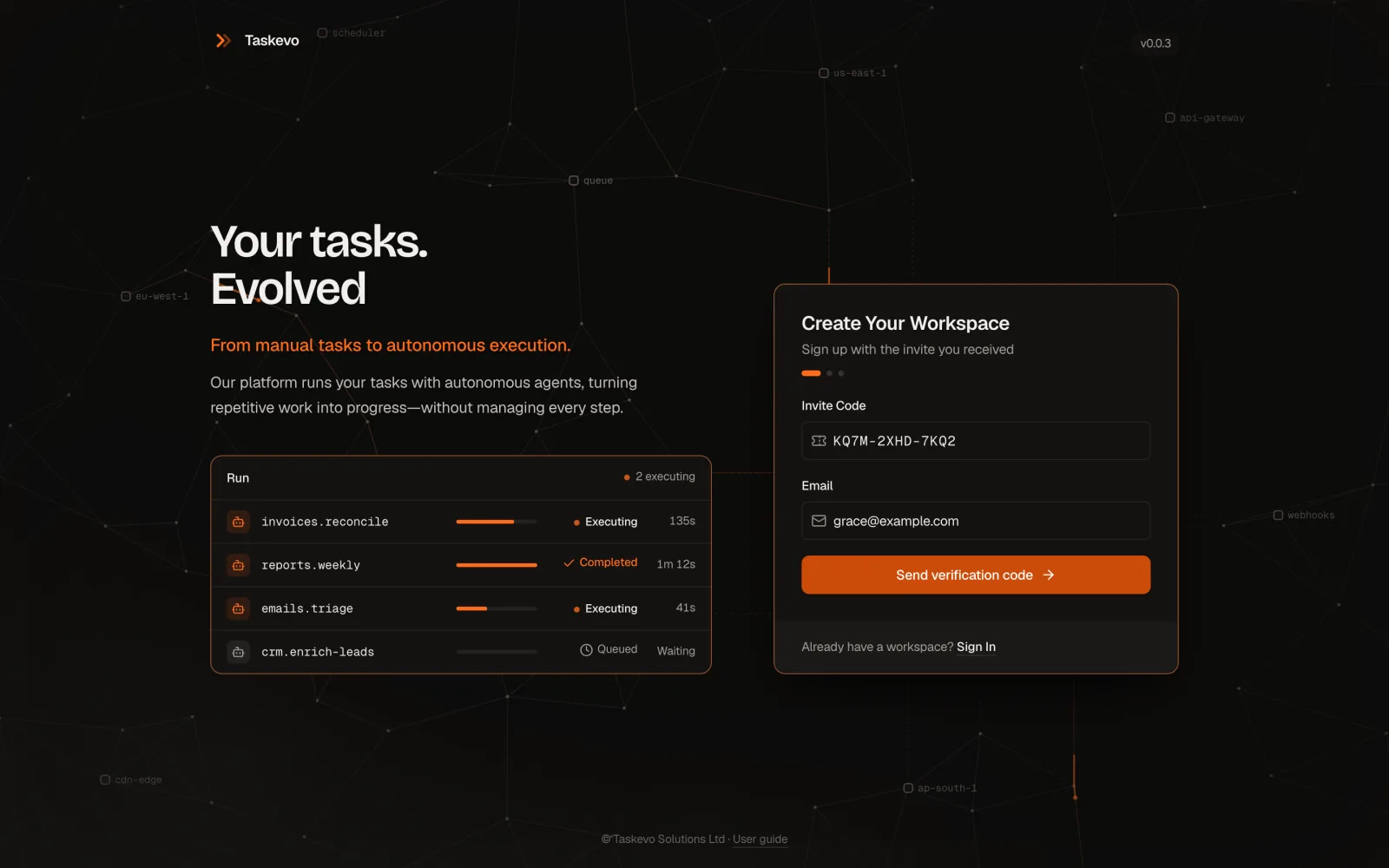
First, enter your invite.
Open the Create your account link in the invitation email: it fills in your Invite Code and Email. You can also go to /signup and type them in. The code looks like XXXX-XXXX-XXXX, and the email must be the address the invite was sent to. Click Send verification code.
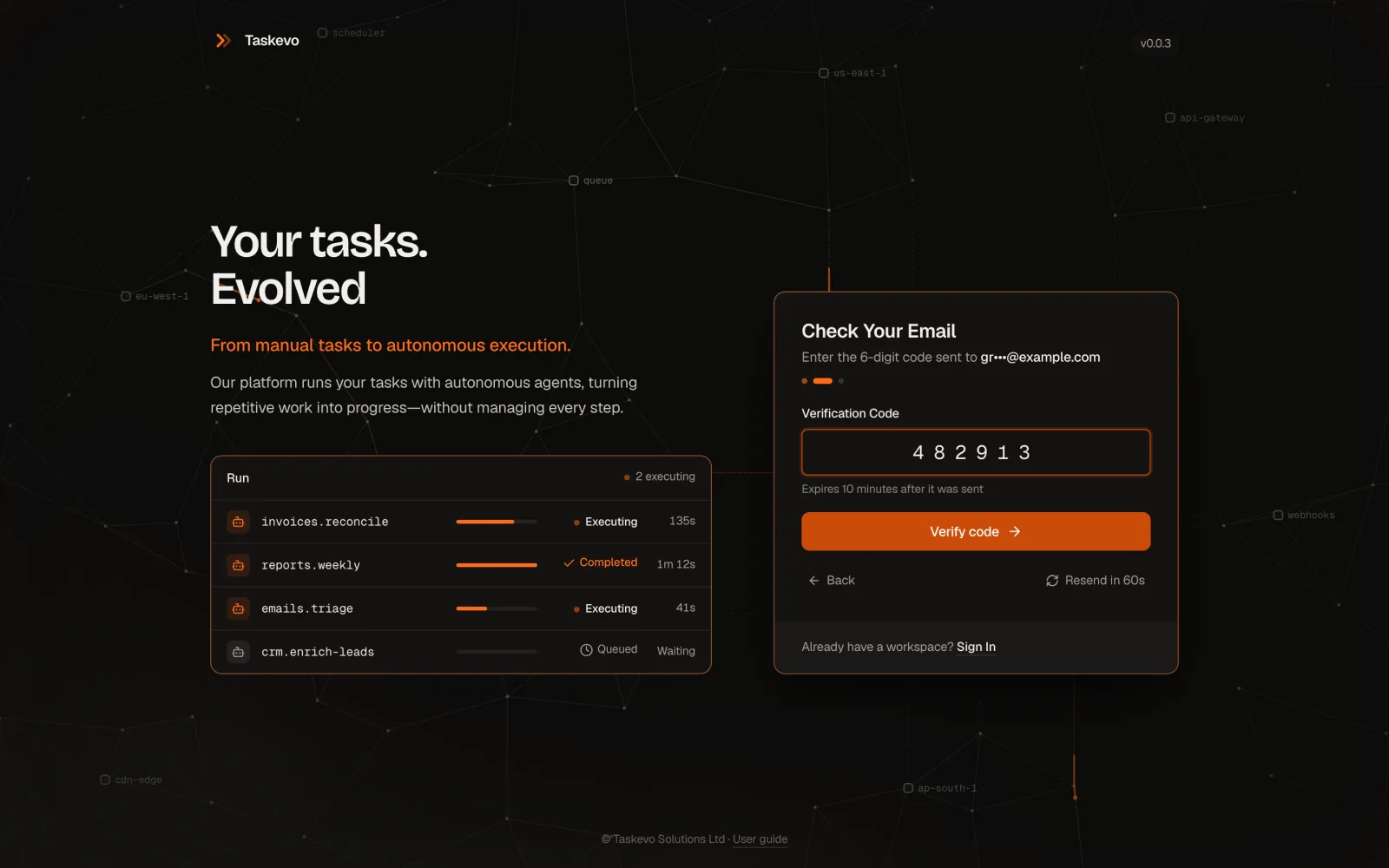
Then confirm your email.
We email a 6-digit Verification Code that works for 10 minutes. Type it and click Verify code. Nothing arrived? Wait a minute and click Resend code; the earlier code stops working. Each code allows 5 wrong tries, and after too many wrong codes in a day you'll need a new invite or a day's wait.
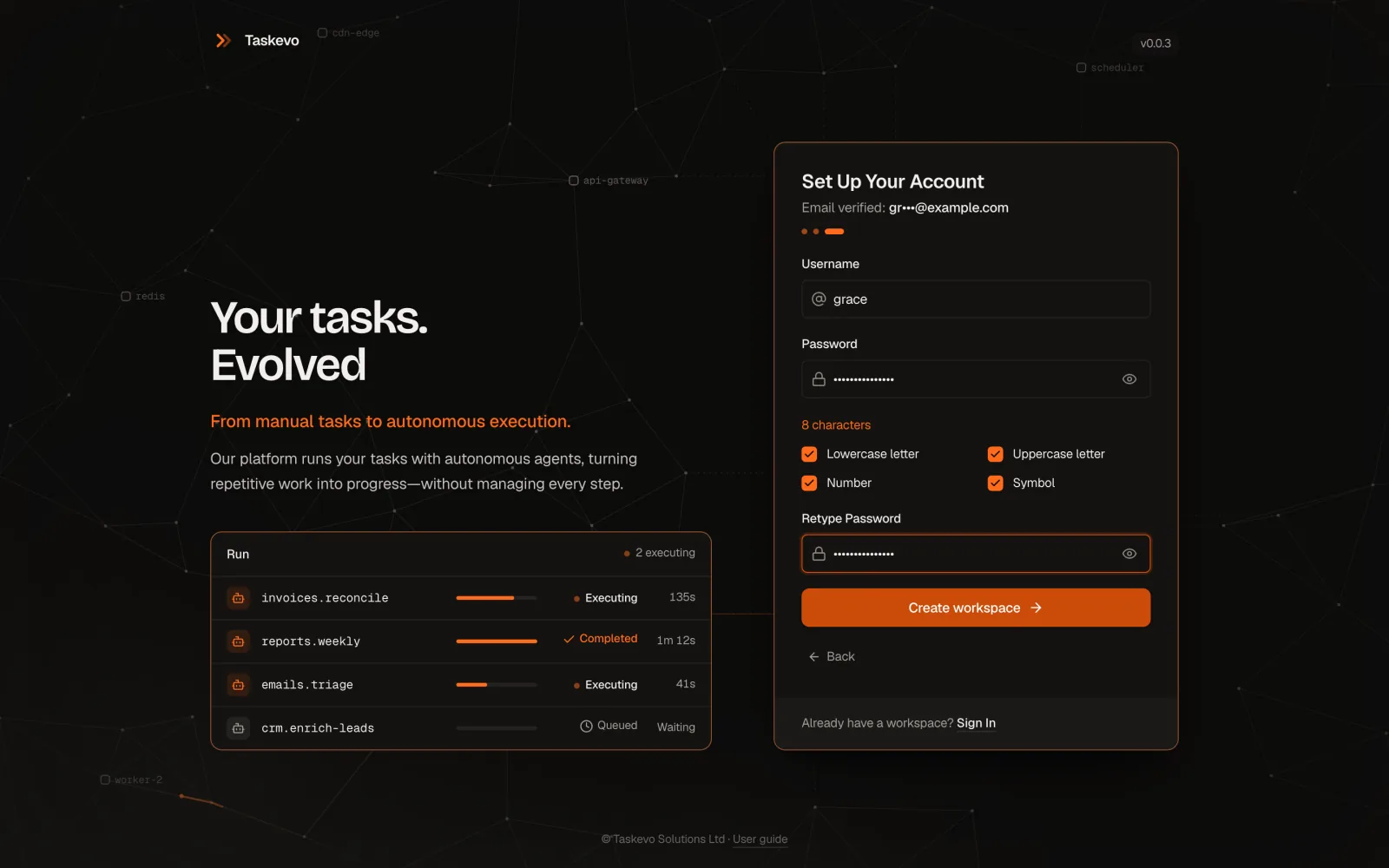
Last, choose your username and password.
The Username is 3–32 letters, numbers, dots, dashes or underscores. The password needs at least 8 characters (12 for administrators, 256 at most), a lowercase and an uppercase letter, a number and a symbol. It can't be your username, your email name or a common password, or repeat one character four times. The checklist under the field ticks each rule as you type. Retype it and click Create workspace: you're signed in.
One invite, one email address, one workspace.
The invite only works with the address it was sent to, and only once. A verification code expires after 10 minutes.
Sign in and find your way
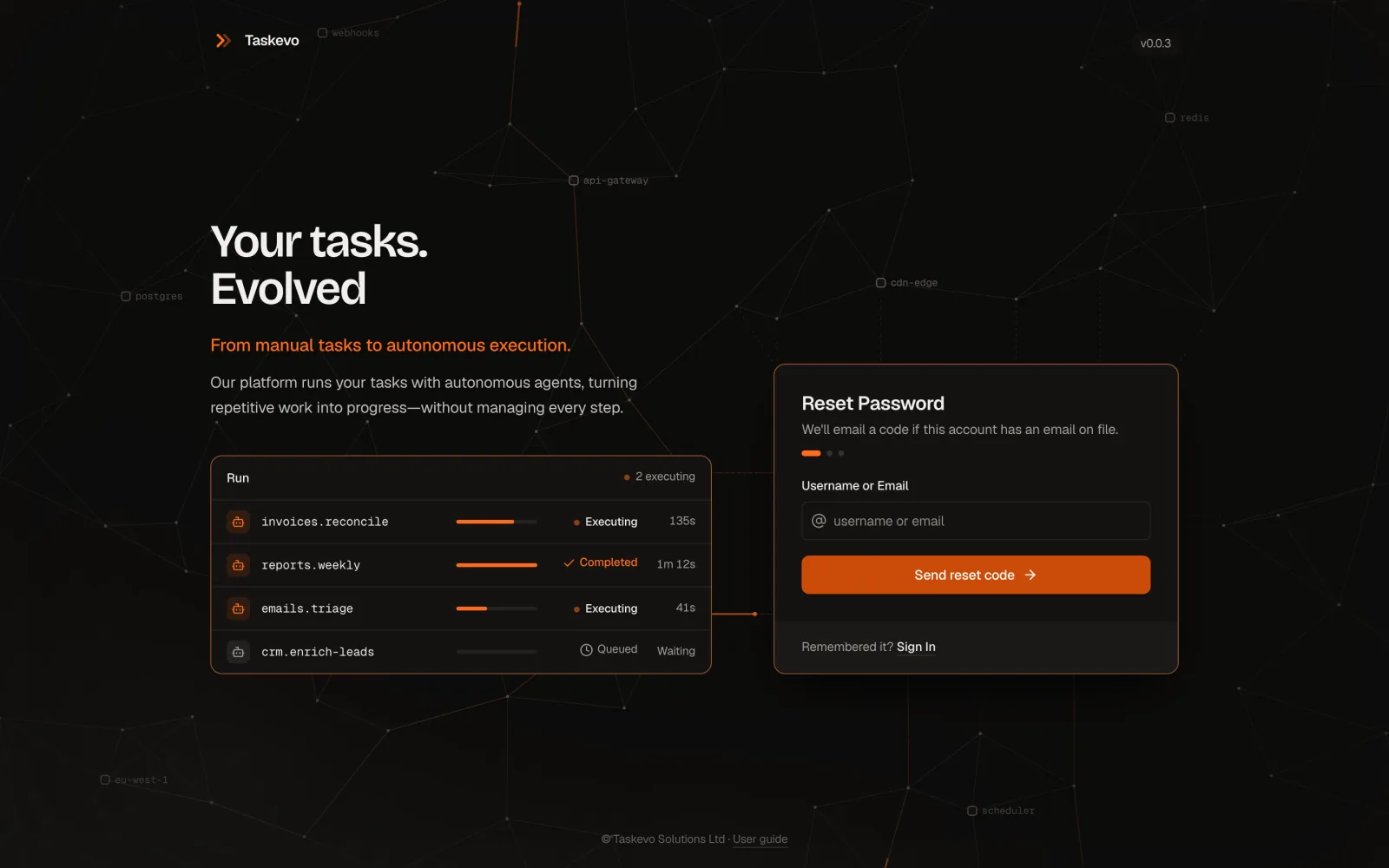
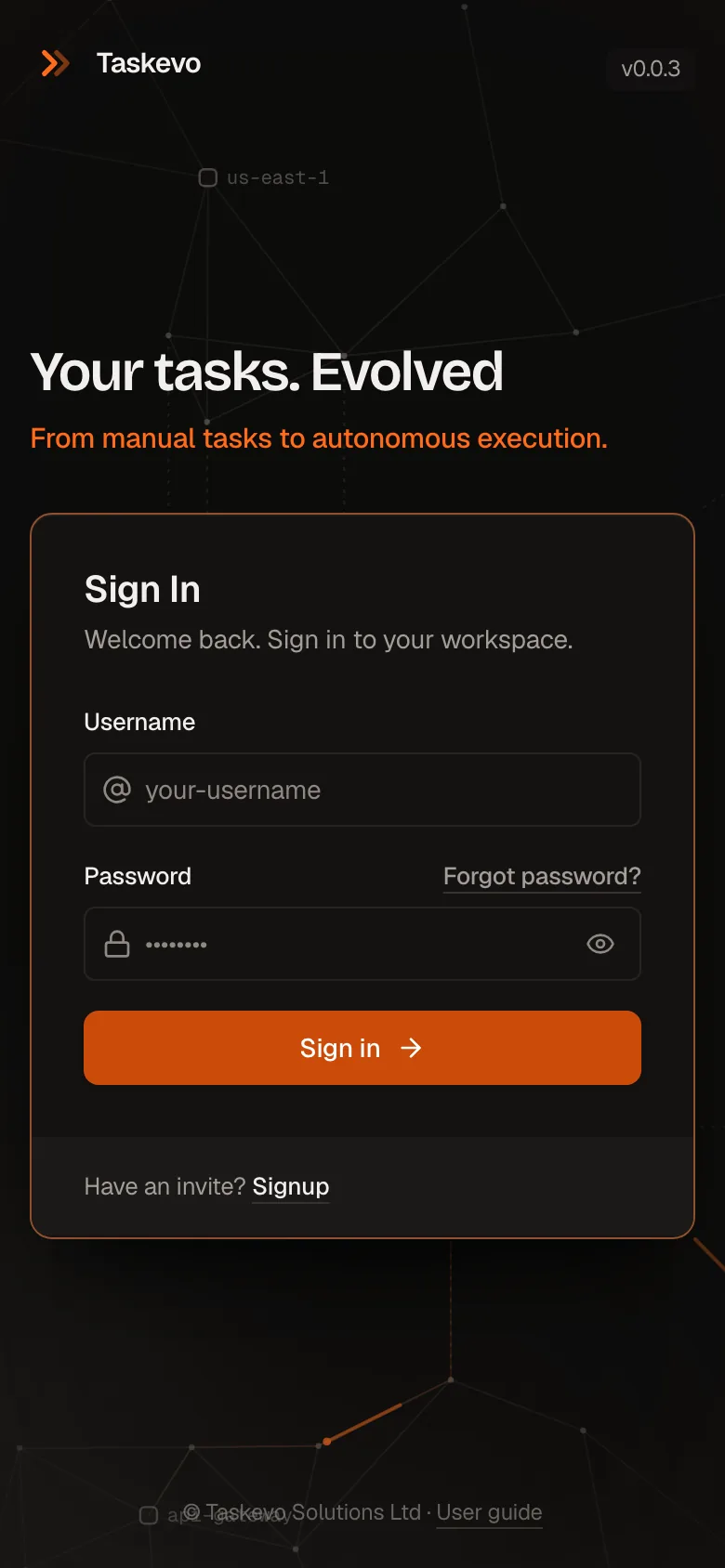
Go to /login, enter your Username and Password and click Sign in. After several wrong attempts, signing in pauses for a while.
Forgot it? Click Forgot password?, enter your Username or Email and click Send reset code. If the account has an email on file, a 6-digit Reset Code arrives, valid for 10 minutes. Enter it and choose a new password: that signs you in and signs out every other session.
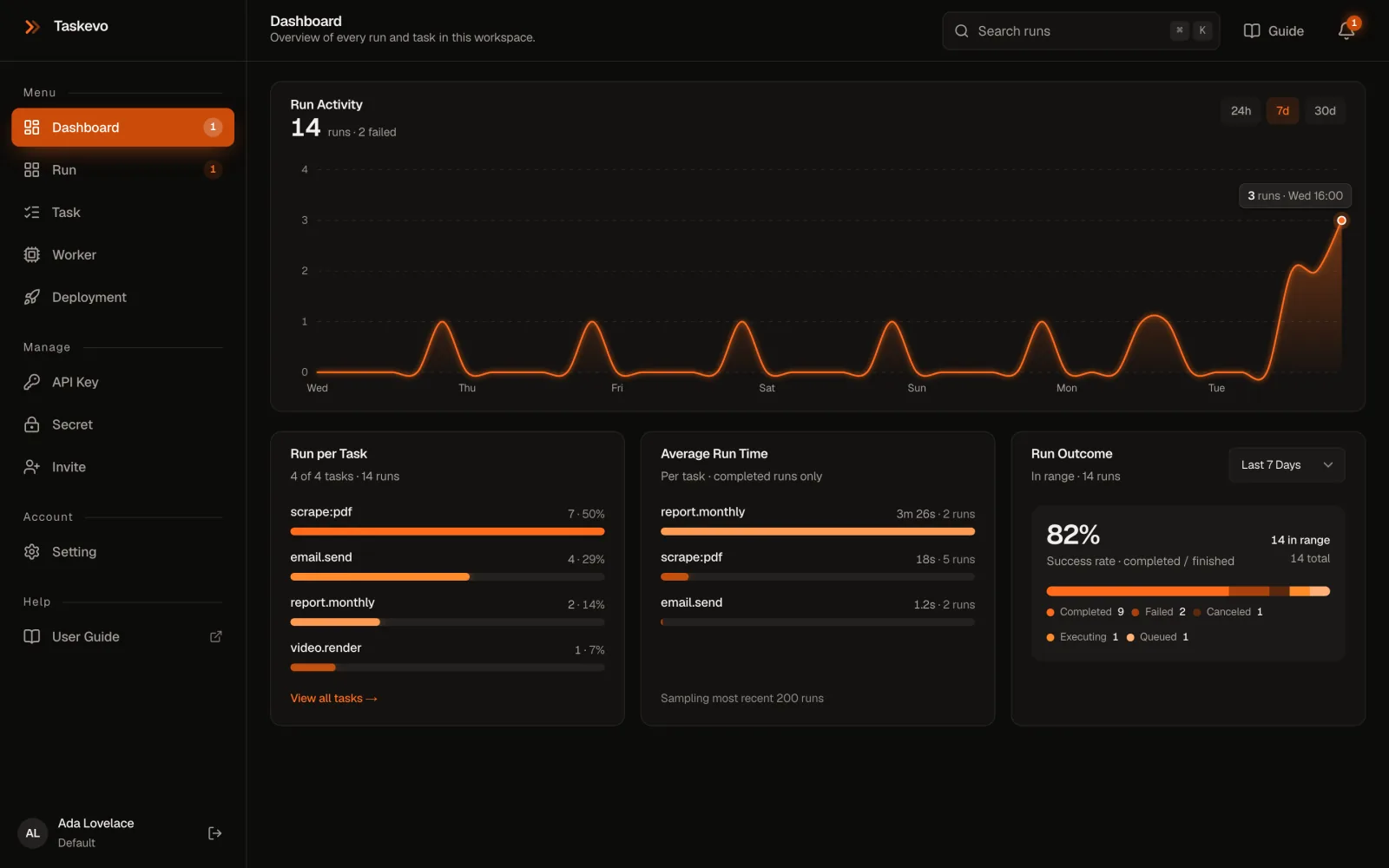
The sidebar holds every page. Run lists runs live; Task shows where each task id runs; Worker shows your workers and the hosted sandboxes; Deployment the versions of your task code; API Key and Secret the credentials; Invite (administrators) and Setting the rest. Guide in the top bar opens this page.
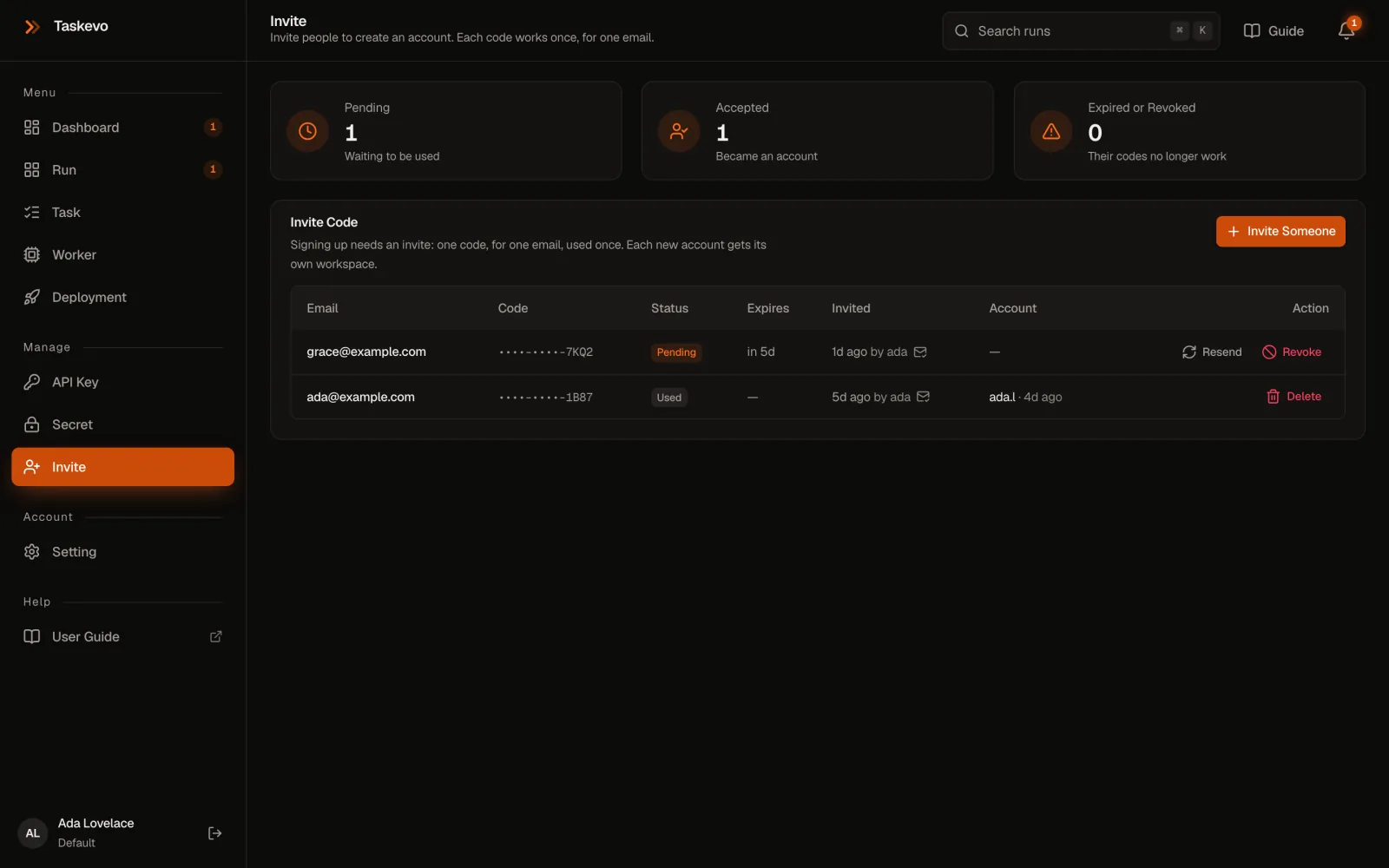
Invite people
Administrators only.
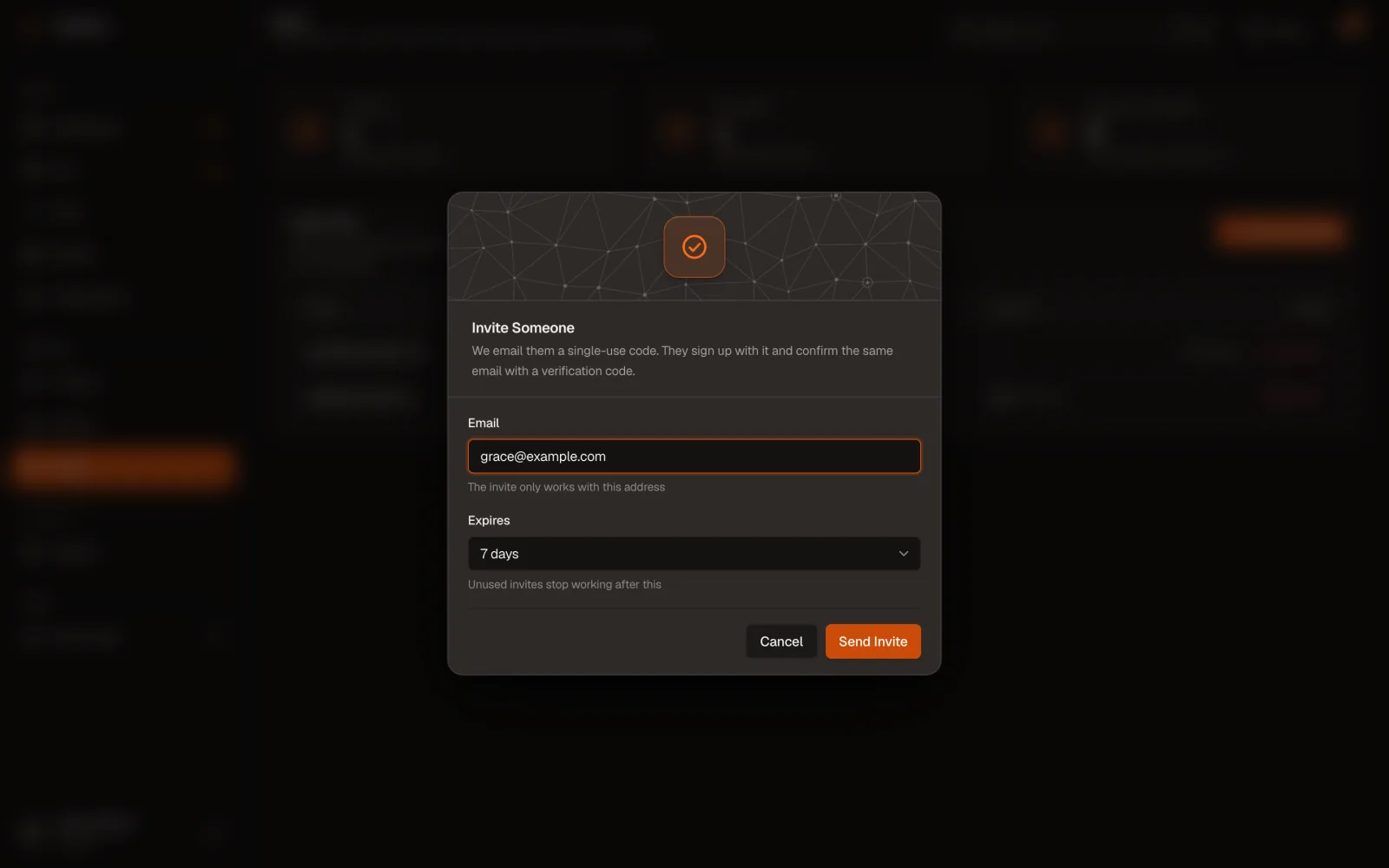
- On Invite, click Invite Someone.
- Enter their Email: the invite only works with that address. Expires is 7 days unless you change it.
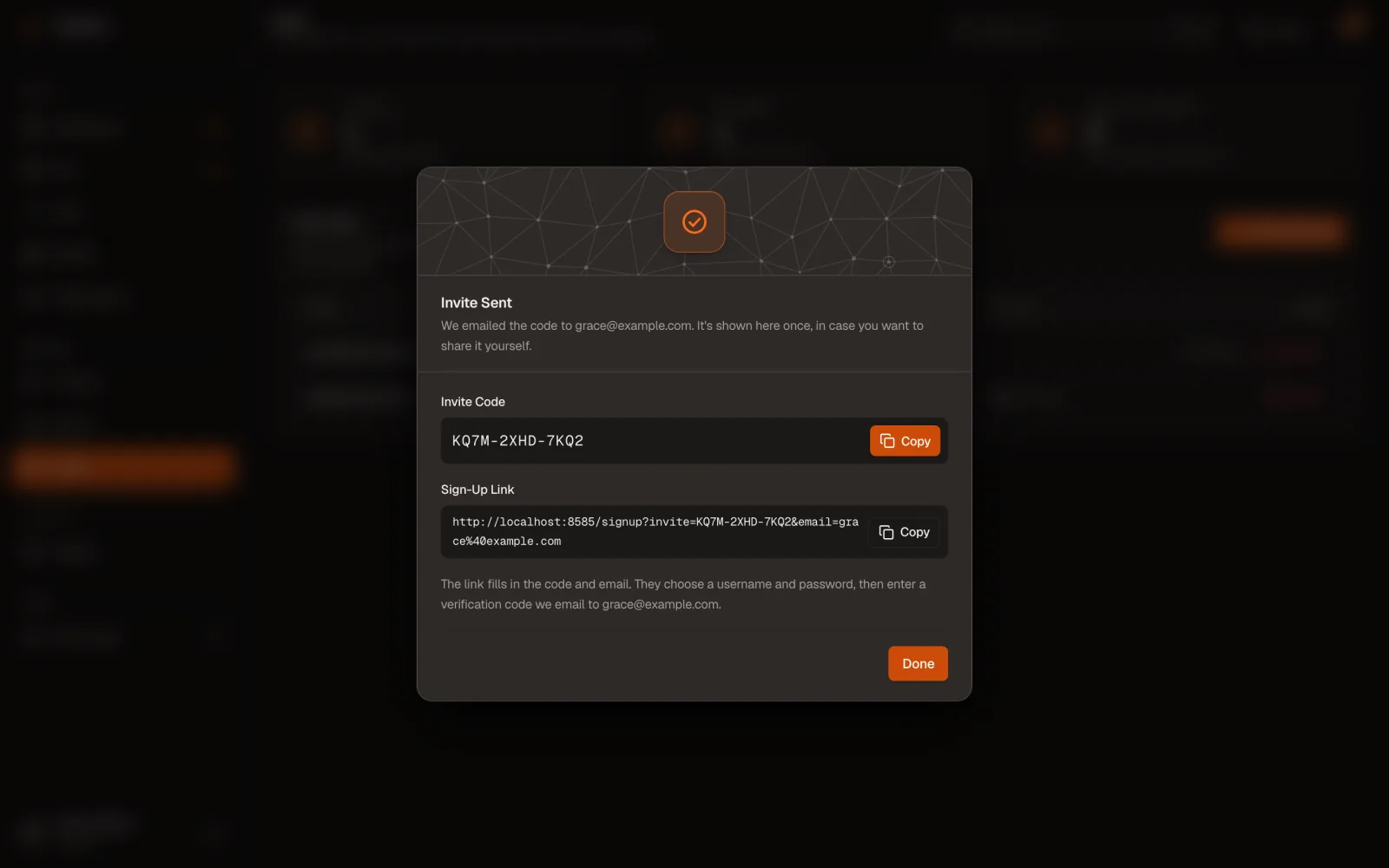
- Click Send Invite. We email the code; the dialog also shows the Invite Code and Sign-Up Link once, so you can pass them on yourself.
The list shows each invite as Pending, Used, Expired or Revoked. On a pending one, Resend sends a new code (the old one stops working) and Revoke cancels it.

Keys and secrets
Keys let your apps, workers and the CLI talk to Taskevo. Secrets give tasks the credentials they need without putting them in code.
API keys
Each key does one job, so a leaked key can do limited harm. Make one per app, worker group and pipeline.
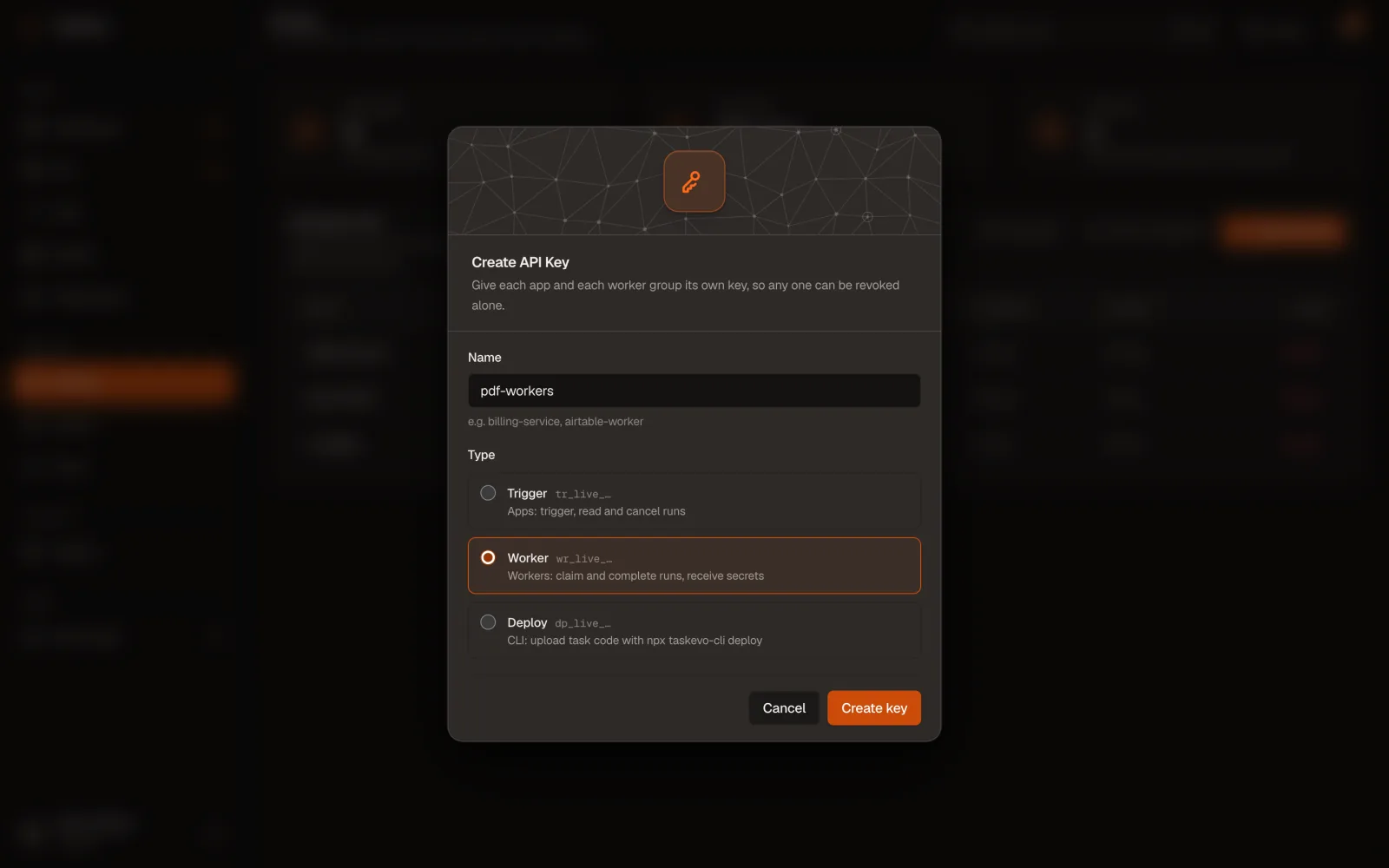
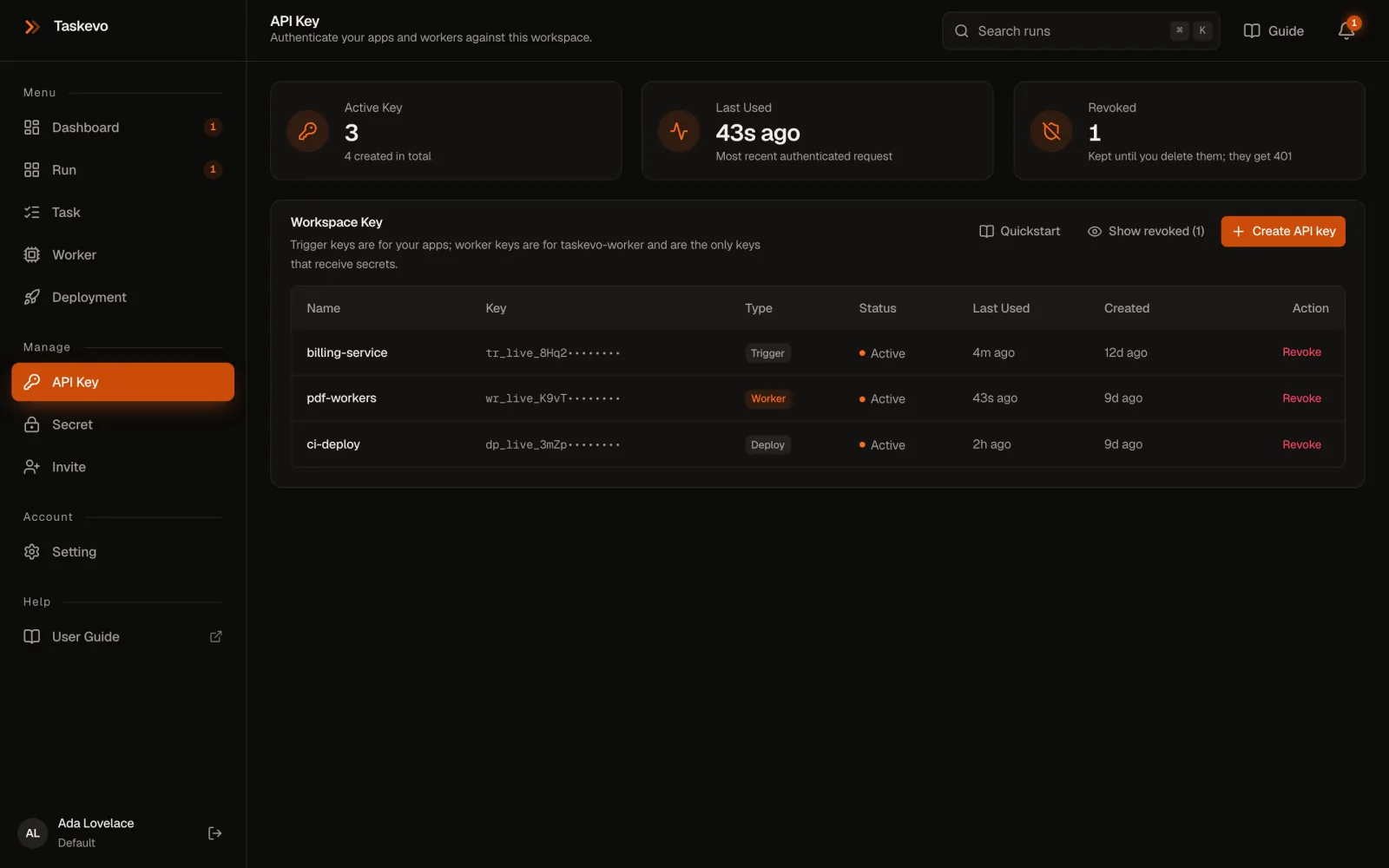
- On API Key, click Create API key.
- Give it a Name you'll recognise, like
billing-serviceorpdf-workers, pick its Type, and click Create key. - Copy the key straight into the
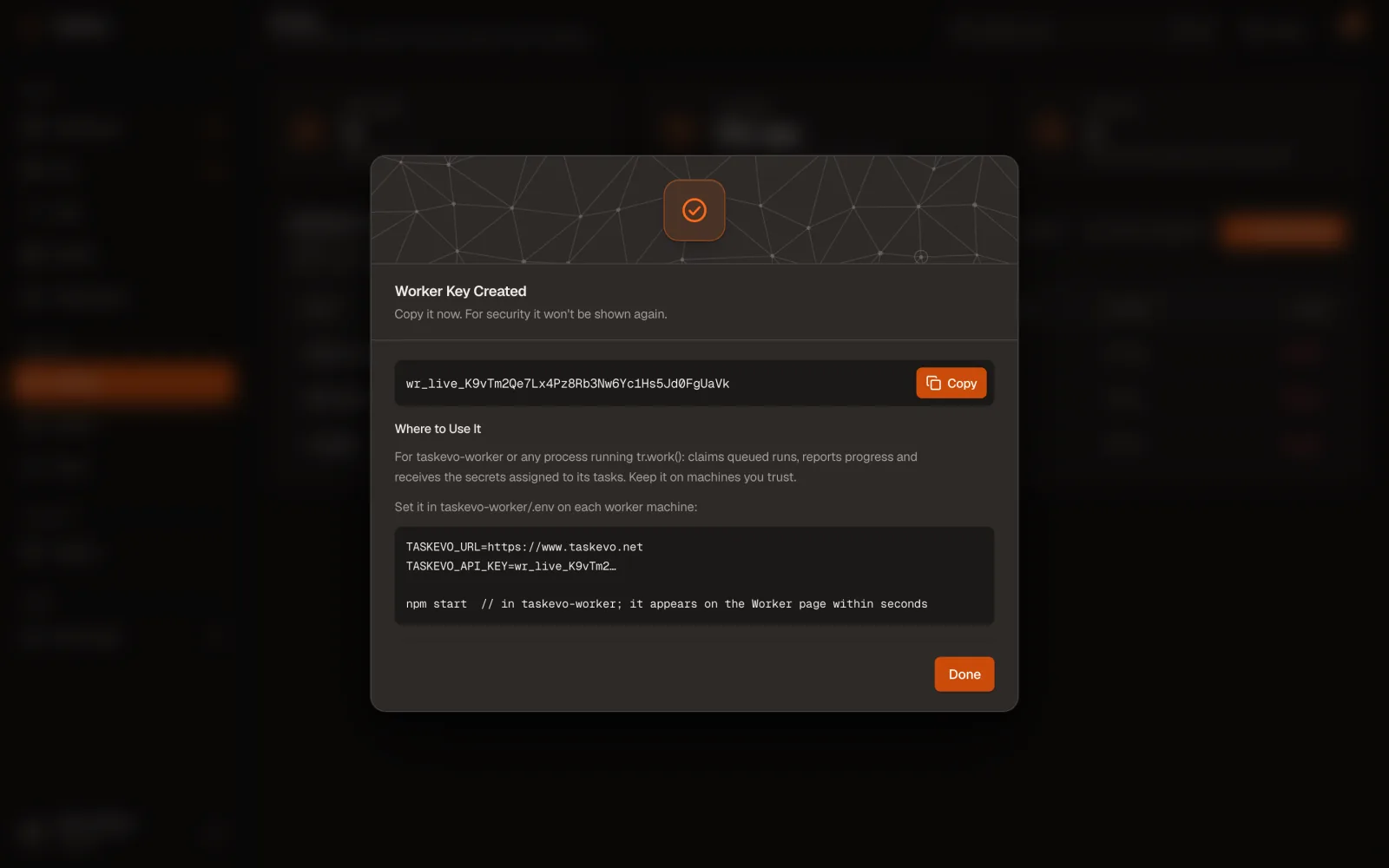
.envof the app, worker or task project that uses it. It's shown once; the dialog names the variable to set.
Keep keys out of git. Put them in .env (listed in .gitignore) or your CI's secret store. If one leaks, click Revoke: requests with it get 401 at once.
| Type | Starts with | Used by | Can |
|---|---|---|---|
| Trigger | tr_live_ | Your apps | Start, read and cancel runs; download output files. Goes in TASKEVO_API_KEY. |
| Worker | wr_live_ | Workers you host | Claim and finish runs. The only type that receives secrets. Goes in TASKEVO_API_KEY on the worker. |
| Deploy | dp_live_ | The CLI and CI | Upload task code and promote versions. Goes in TASKEVO_DEPLOY_KEY. |
The page's Quickstart has copy-ready cURL, Node trigger and worker examples, filled in with your address.
A key is shown once. Copy it into .env, never into git.
Lost it? Create a new one and revoke the old one: requests with a revoked key fail at once.
Secrets
Credentials such as an OpenAI key or an SMTP password go on the Secret page, never in code or payloads. They're encrypted before storage and can't be read back. A task reads them as ctx.secrets.NAME.
- Click Add Secret. Name in UPPER_SNAKE_CASE, like
OPENAI_API_KEY; Value is the credential. - Task: the task ids that may use it, comma-separated (
scrape:pdf), or tick All tasks in this workspace. - For tasks on Launchpad, also tick Also for hosted tasks (Launchpad). Without it only your own workers receive it.
- Click Save secret.
"OPENAI_API_KEY is not set" on a hosted run? The secret exists but isn't allowed for hosted tasks. Click Replace, re-enter the value, tick Also for hosted tasks and save; the row then shows Hosted too. Hosted code comes from whoever holds a deploy key, so tick it only for secrets that code really needs.
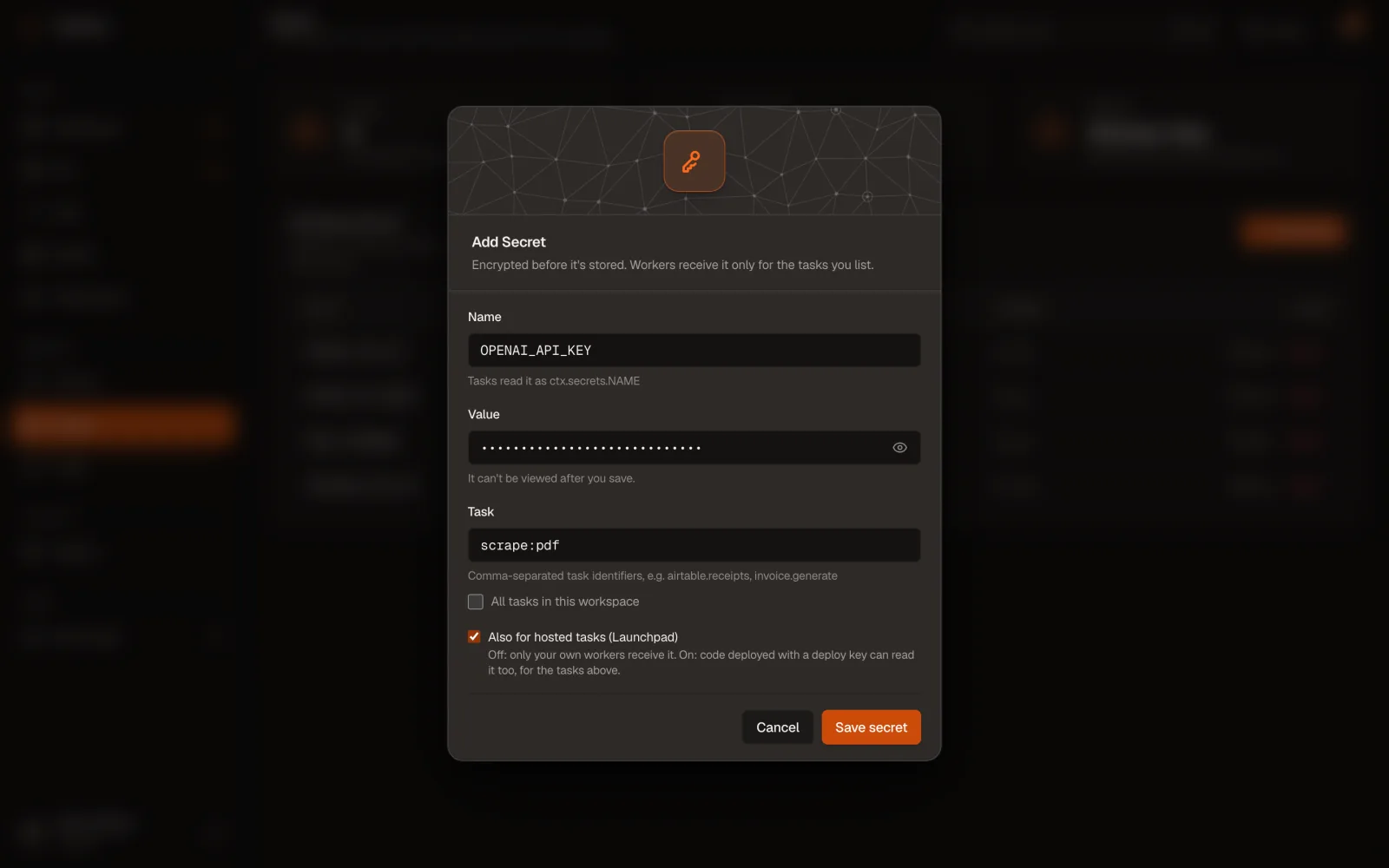
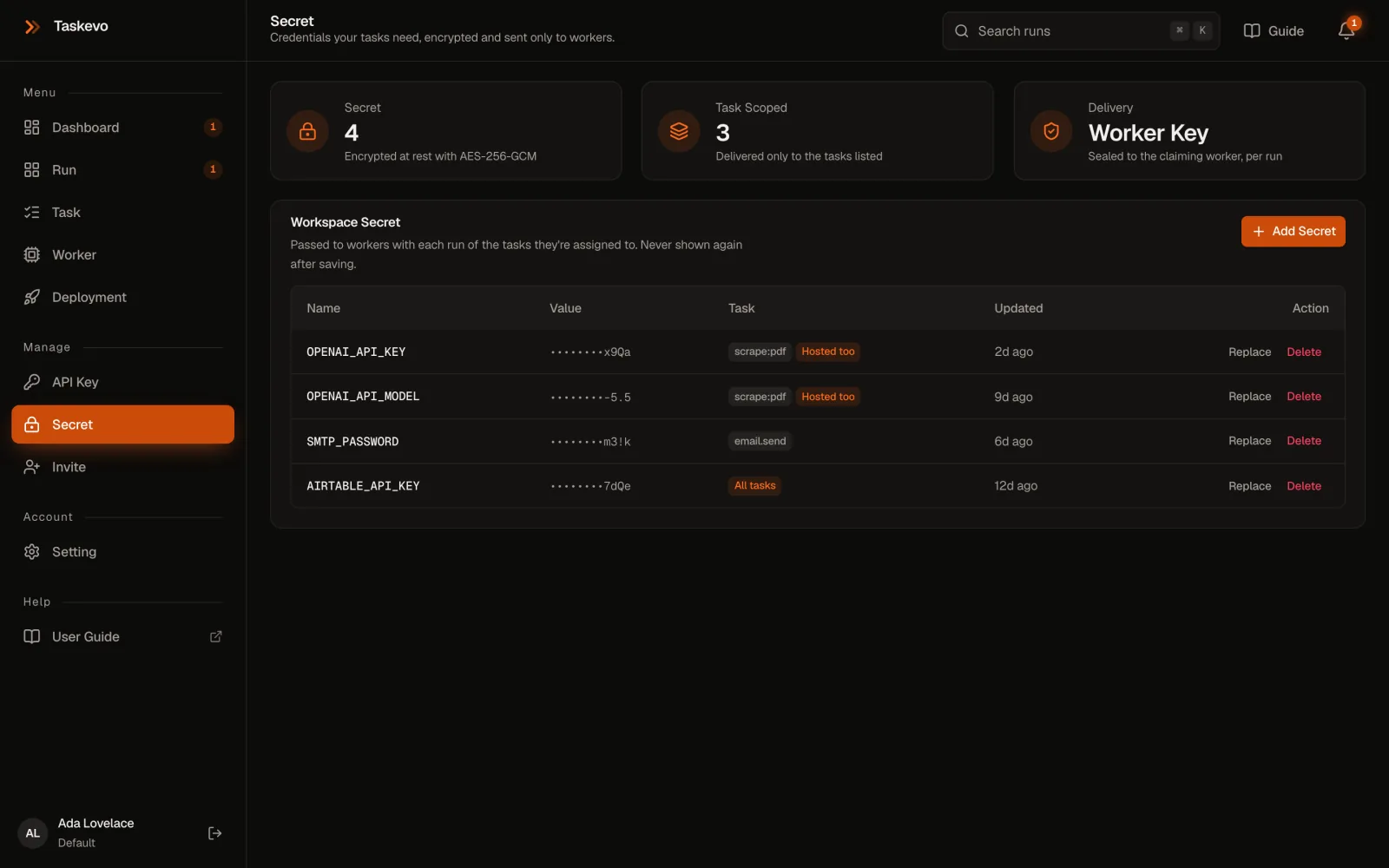
Launchpad gets a secret only when you tick Also for hosted tasks.
Without it, only your own workers receive the value, and a hosted run reports the secret as not set.

Build and run tasks
Write a task, ship it to Launchpad or run it on your own machine, trigger it from your app, and collect what it produced.
Write and deploy tasks
On Launchpad you keep tasks in your own repository and deploy them with the CLI. Taskevo builds an image and runs each run in an isolated sandbox: no server to host.
First, start a task project.
init asks for the folder, package name, first task id, TypeScript or JavaScript, the sandbox's Node.js version and your Taskevo address. Existing project? npm i taskevo-sdk && npm i -D taskevo-cli.
npx taskevo-cli init my-tasks
cd my-tasks
created tasks/hello.ts an example task()
created scripts/trigger.mjs triggers it with a Trigger key
created taskevo-core.config.mjs Node version, apt packages, build steps
created .env .env.example TASKEVO_URL, keys (readable by you only)
created README.md .gitignore tsconfig.jsonThen write the task.
Export a task() from any file in tasks/. run(payload, ctx) gets the JSON payload; its JSON return value is the run's output, and a thrown error fails the run.
// tasks/scrape.ts
import { writeFile } from "node:fs/promises";
import { join } from "node:path";
import { task } from "taskevo-sdk";

export const scrapePdf = task({
  id: "scrape:pdf",                 // what your apps trigger
  machine: "micro",                // micro | small | medium | large | xl
  maxDurationSec: 300,             // the run fails after this
  secrets: ["OPENAI_API_KEY"],      // from the Secret page
  run: async (payload, { progress, log, secrets, signal, outputDir }) => {
    await progress(10, "Starting");
    log("PDF", payload.url);
    const data = { title: "Invoice INV-2041" };   // your work; stop early if signal.aborted
    await writeFile(join(outputDir, "document.json"), JSON.stringify(data));
    return { url: payload.url, ...data };         // the run's output
  },
});| ctx | What it does |
|---|---|
progress(pct, message?) | Moves the run's progress bar and adds to its timeline |
log(...), console.* | Write to the timeline |
secrets | Only the secrets this task declares |
signal | Aborts on cancel or timeout |
tmpDir | Scratch space, deleted after the run |
outputDir | Files here are kept with the run for 30 days (output files) |
run | The run's id, attempt and tags |
Try it on your machine.
No server or key needed: the task gets the same ctx it gets on the platform. Files it writes land in ./taskevo-outputs/<run id>/, and a failure exits with code 1, so it fits in CI.
npx taskevo-cli test scrape:pdf '{"url":"https://example.com/a.pdf"}' --secret OPENAI_API_KEY=sk-…Last, deploy it.
Create a Deploy key and put TASKEVO_URL and TASKEVO_DEPLOY_KEY in the project's .env. doctor checks Node.js, npm, the key and the connection; deploy compiles, uploads and follows the build.
npx taskevo-cli doctor
npx taskevo-cli deploy
• Compiling tasks (taskevo-core.config.mjs)…
• 1 task:
scrape:pdf micro, ≤300s, secrets: OPENAI_API_KEY dist/tasks/scrape.mjs#scrapePdf
• Uploading 34.7 KB (4 files) to https://www.taskevo.net…
• Version v3 uploaded.
• Waiting for the platform to build it…
│ [micro] install dependencies: ok (2.5s)
│ [micro] indexed 1 task(s) inside the sandbox: scrape:pdf
v3 is live. Runs of its tasks now execute on the platform.Versions and rollback
Each deploy is a new version. Deployment lists them with their tasks, build time and Build Log. New runs use the Current version; replays keep the version they first ran on. To roll back, open an older version and click Make Current, or run npx taskevo-cli promote 2.
Needs Approval. A version that asks for secrets the current one doesn't use, or that takes over tasks your own workers run, waits until someone signed in to the dashboard clicks Approve & Make Current. A stolen deploy key can't deploy code that reads your secrets.
Task shows each task id, where it runs (v3 · micro · ≤5 min for Launchpad, Self-hosted worker, Simulated) and its latest run, with missing secrets flagged. Optional build settings live in taskevo-core.config.mjs: node (20, 22 or 24), build.apt for system packages such as ffmpeg, build.commands for extra steps.
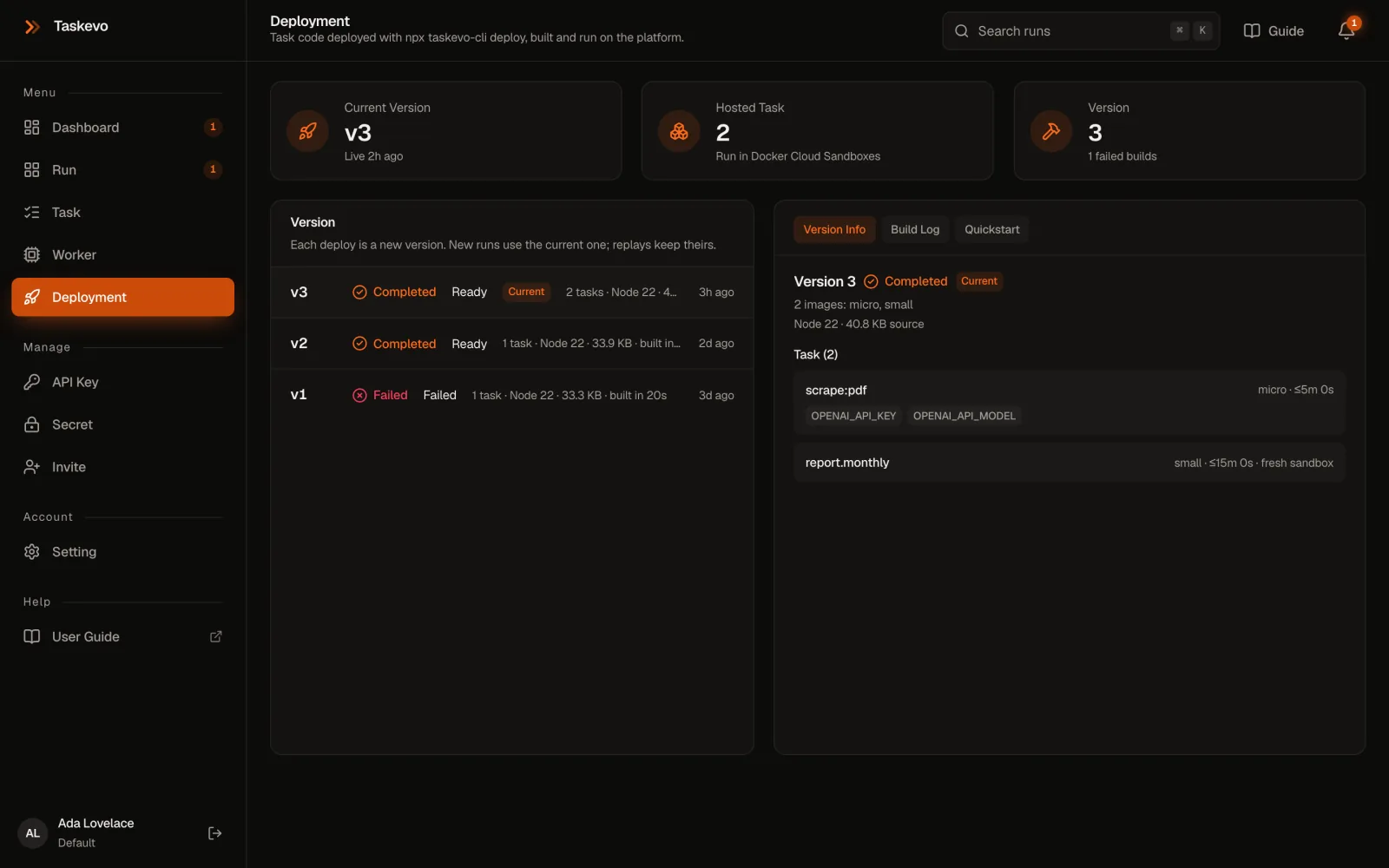
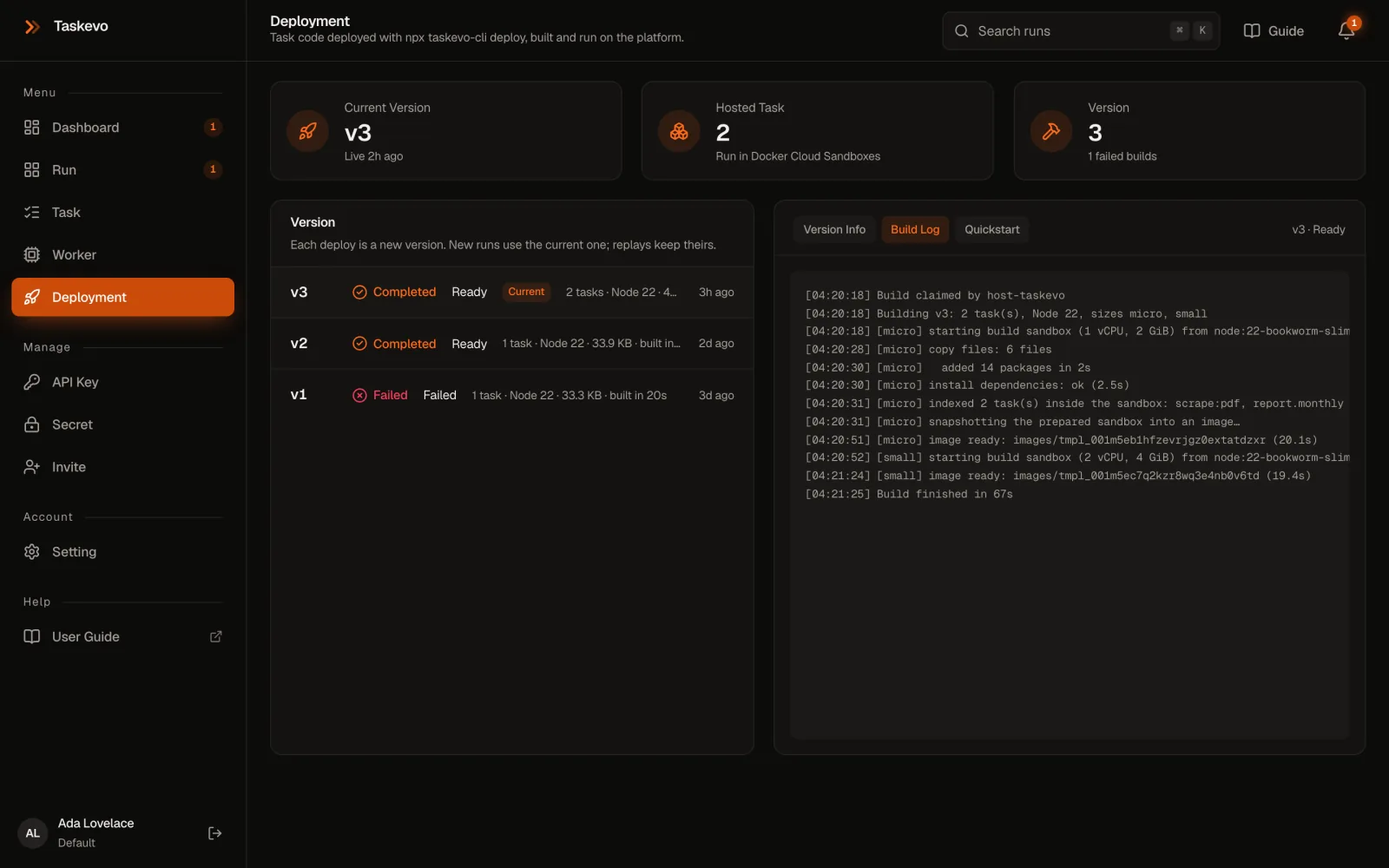
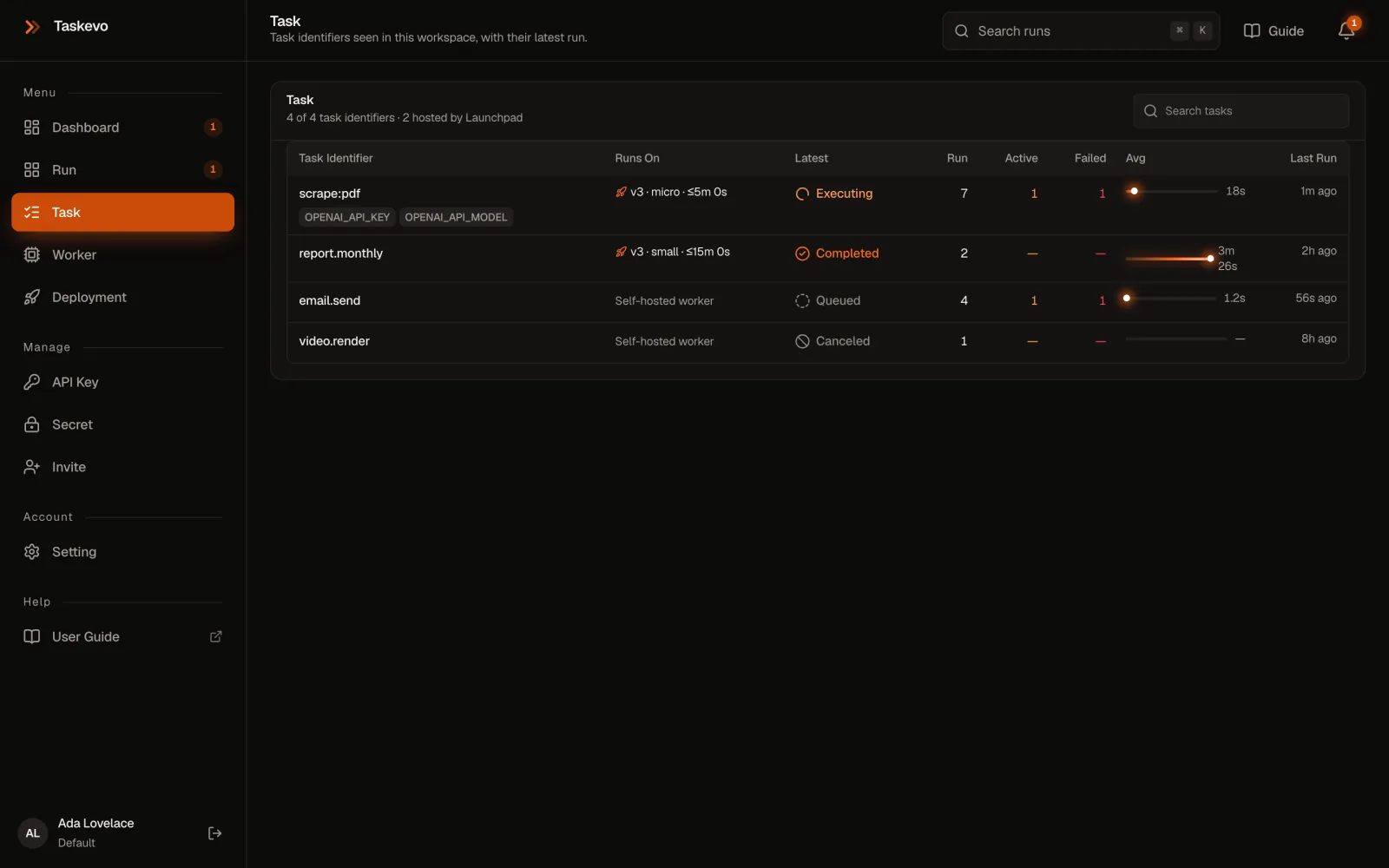
Every deploy is a new version. Rolling back is one click.
Replays keep the version they first ran on; new runs use the current one.
Run a worker
Use a worker when a task must run inside your network, on special hardware, or next to data that can't leave your servers. It only makes outgoing HTTPS requests: it claims queued runs of its tasks, reports progress and sends the result. A task id deployed to Launchpad runs there; any other one waits for a worker.
The taskevo-worker project
A ready-made worker with PM2, graceful restarts and one file per task.
git clone <your taskevo-worker repository> && cd taskevo-worker
./setup.sh             # first run writes .env: add the Worker key, run again
npm run check          # .env, tasks, address and key
npm run prod:start     # under PM2; prod:reload after changes
# .env
TASKEVO_URL=https://www.taskevo.net
TASKEVO_API_KEY=wr_live_… # a Worker key
TASKEVO_CONCURRENCY=2 # runs at once
# TASKEVO_TASKS=scrape:pdf # only these tasks hereAdd a task as src/tasks/<name>.mjs exporting id, run(payload, ctx) and optional secrets, then list it in src/tasks/index.mjs.
Your own app, with taskevo-sdk
Any Node.js 20+, Bun or Deno process can be a worker:
import { TaskevoSdk } from "taskevo-sdk";
const tr = new TaskevoSdk({ baseUrl: process.env.TASKEVO_URL, apiKey: process.env.TASKEVO_API_KEY });

tr.work({
  "email.send": async (payload, { progress, secrets }) => {
    await progress(25, "Rendering");
    return { messageId: "m-8812" };      // secrets.SMTP_PASSWORD from the Secret page
  },
}, { concurrency: 2 });
While developing
npx taskevo-cli dev runs your project's tasks on your machine as a worker (Worker key in TASKEVO_API_KEY). It only gets runs of task ids that aren't deployed yet.
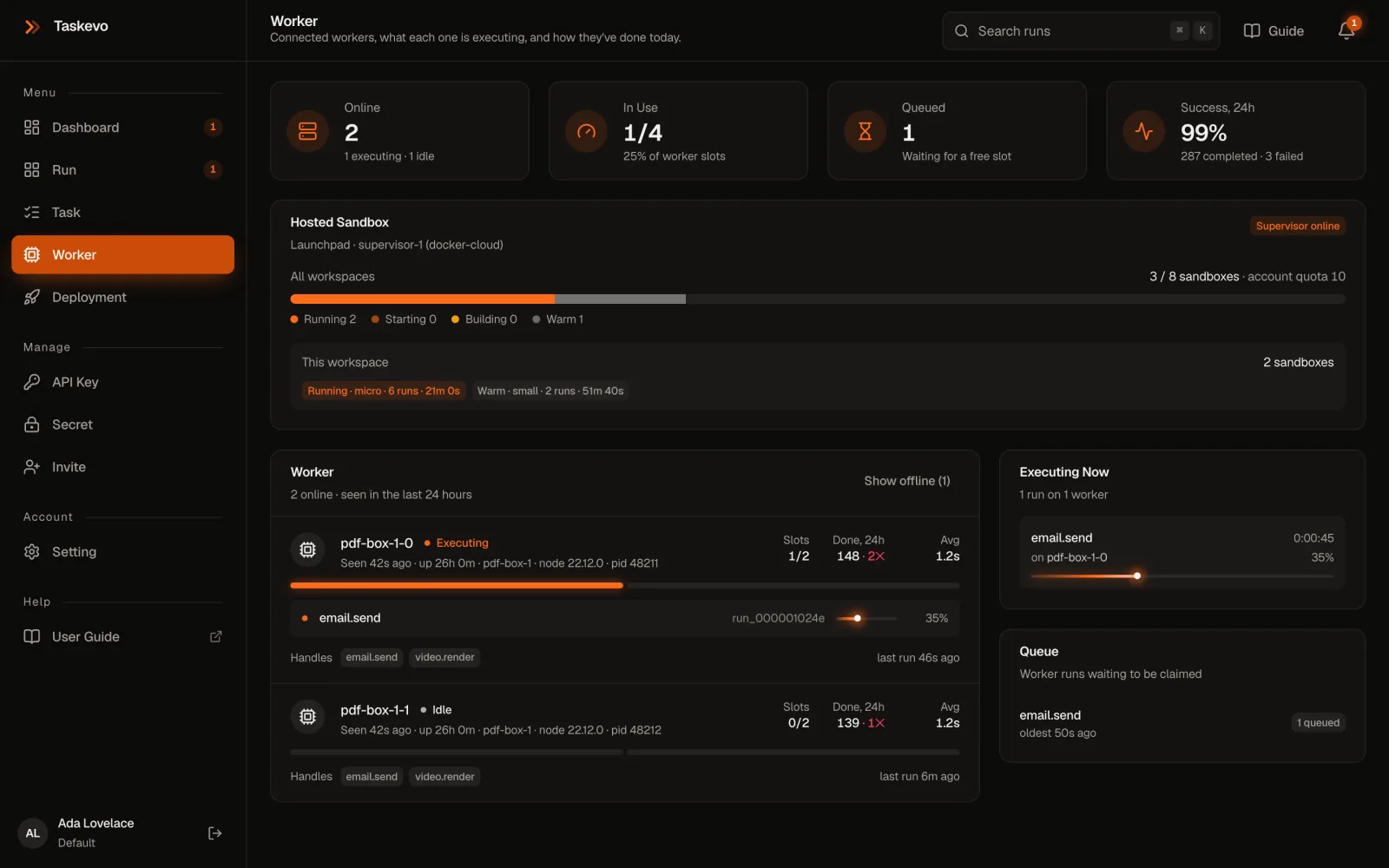
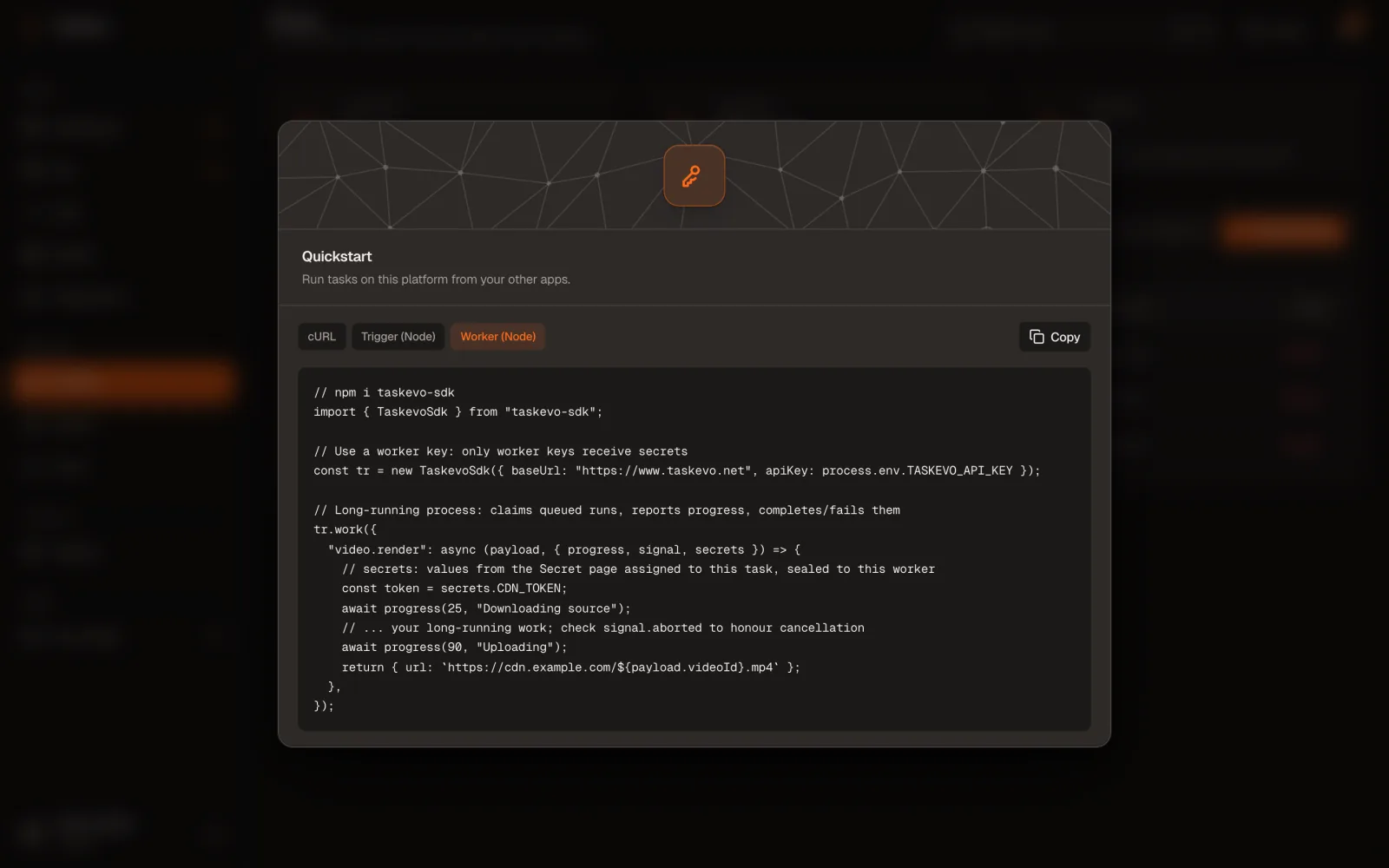
Nothing connects to a worker. It only calls out over HTTPS.
Run it behind your firewall, next to the data, on the hardware the task needs.
Trigger runs
Your app starts a run with a Trigger key and a JSON payload. The call returns at once with the run id; the run executes in the background. The console at the top of this page builds these calls for you.
| Option | |
|---|---|
idempotencyKey | The same key returns the existing run instead of starting another, so retries are safe (≤256 characters) |
tags | Up to 10 labels shown on the run, like customer:42 |
title | A display title, up to 200 characters |
Limits: payload 256 KB of JSON, 600 requests a minute per key, 1,000 runs waiting per workspace. Every method is in the taskevo-sdk reference.
Or from the dashboard
On Run, click Test Task (or press T). Enter the Task Identifier and a JSON Payload, pick Executed By (External worker runs it for real, on Launchpad when deployed; Simulated runtime only plays progress) and click Run Test.
taskevo-sdk
import { TaskevoSdk } from "taskevo-sdk";
const tr = new TaskevoSdk({ baseUrl: "https://www.taskevo.net", apiKey: process.env.TASKEVO_API_KEY });

// returns the run id at once
const { id } = await tr.trigger("scrape:pdf", { url: "https://example.com/invoice.pdf" },
  { idempotencyKey: "invoice-2041", tags: ["customer:42"] });

// or wait for the output (throws if the run fails)
const output = await tr.triggerAndWait("scrape:pdf", { url: "https://example.com/invoice.pdf" });

// status, progress, output and timeline
const { run, events } = await tr.retrieveRun(id);
HTTP
curl -X POST https://www.taskevo.net/api/v1/tasks/scrape:pdf/trigger \
  -H "Authorization: Bearer $TASKEVO_API_KEY" \
  -H "Content-Type: application/json" \
  -H "Idempotency-Key: invoice-2041" \
  -d '{"payload":{"url":"https://example.com/invoice.pdf"}}'
# → 201 {"id":"…","run":{…}}

curl https://www.taskevo.net/api/v1/runs/<run-id> -H "Authorization: Bearer $TASKEVO_API_KEY"
curl -X POST https://www.taskevo.net/api/v1/runs/<run-id>/cancel -H "Authorization: Bearer $TASKEVO_API_KEY"
The project's script
# in a project made with taskevo-cli init, Trigger key in .env
node scripts/trigger.mjs '{"url":"https://example.com/invoice.pdf"}'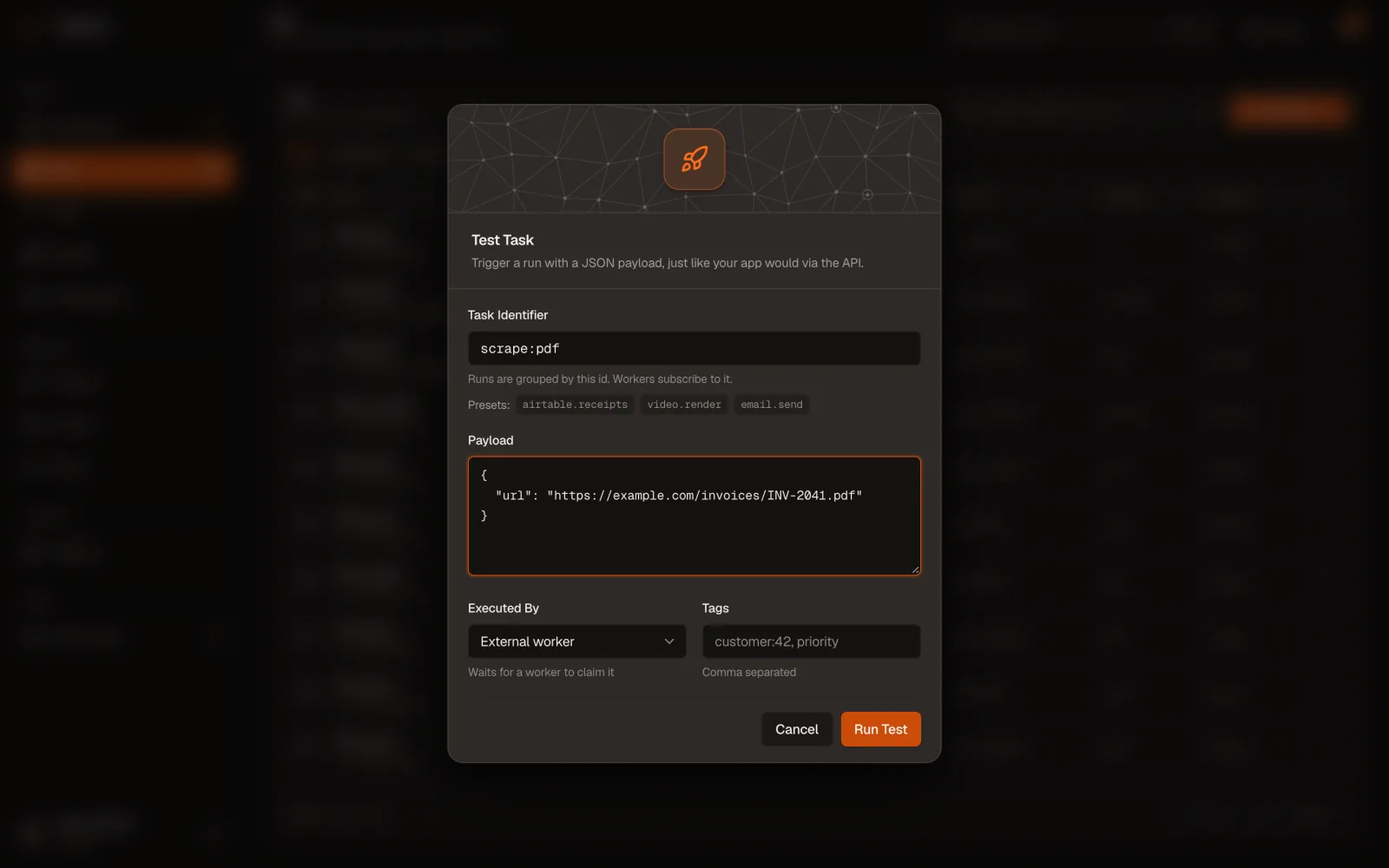
Follow runs and get their files
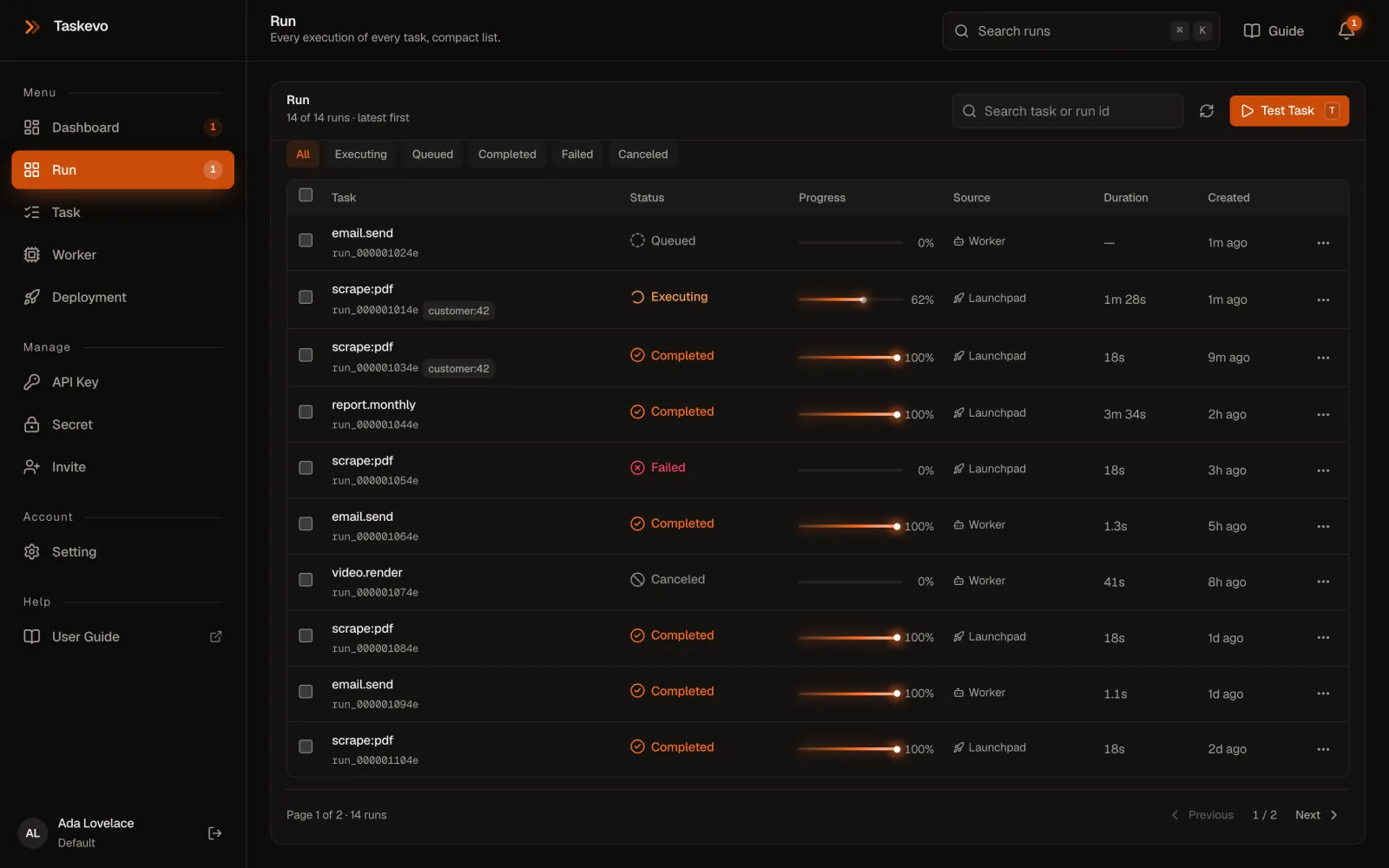
Run lists every run, newest first, live. Filter by status (Queued, Executing, Completed, Failed, Canceled), search by task or run id, or select several to cancel or delete together. Source says where each one ran (Launchpad, Worker) or how it started (API, Dashboard).
What you can do with a run
- Replay starts a new run with the same task, payload and deployment version.
- Cancel run stops a queued or running run; the task sees it through
ctx.signal. - Delete removes the run, its timeline and its files.
- Download outputs appears when the run saved files.
Anything a task writes into ctx.outputDir, folders included, is saved with the run when the task returns, and also when it throws. The run's Files panel lists them: the download icon gets one file, Download all (.zip) gets everything.
Kept 30 days, then deleted (at once if you delete the run). 200 files, 50 MB each, 100 MB per run; larger files are skipped with a note. Symlinks and files of cancelled or timed-out runs aren't saved. Needs a deploy with taskevo-cli 1.1+ or a worker on taskevo-sdk 1.2+.
{
  "url": "https://example.com/invoices/INV-2041.pdf",
  "title": "Invoice INV-2041",
  "documentType": "invoice",
  "summary": "Invoice from Northwind Supplies to Contoso Ltd for 3 items, due 2026-11-20.",
  "fields": [
    { "name": "Invoice number", "value": "INV-2041" },
    { "name": "Total", "value": "€1,284.00" },
    { "name": "Due date", "value": "2026-11-20" }
  ],
  "sections": [
    { "heading": "Payment terms", "text": "Net 30. Bank transfer." }
  ],
  "tables": [
    { "caption": "Items", "columns": ["Item", "Qty", "Price"],
      "rows": [{ "cells": ["Paper A4", "10", "€42.00"] }] }
  ]
}{
"url": "https://example.com/invoices/INV-2041.pdf",
"title": "Invoice INV-2041",
"documentType": "invoice",
"summary": "Invoice from Northwind Supplies to Contoso Ltd for 3 items, due 2026-11-20.",
"fields": [
{ "name": "Invoice number", "value": "INV-2041" },
{ "name": "Total", "value": "€1,284.00" },
{ "name": "Due date", "value": "2026-11-20" }
],
"sections": [
{ "heading": "Payment terms", "text": "Net 30. Bank transfer." }
],
"tables": [
{ "caption": "Items", "columns": ["Item", "Qty", "Price"],
"rows": [{ "cells": ["Paper A4", "10", "€42.00"] }] }
]
}Invoice INV-2041
Source: https://example.com/invoices/INV-2041.pdf
Type: invoice
Summary
Invoice from Northwind Supplies to Contoso Ltd for 3 items, due 2026-11-20.
Fields
Invoice number: INV-2041
Total: €1,284.00
Due date: 2026-11-20
Payment terms
Net 30. Bank transfer.
1 table saved as CSV in tables/.
| name | value |
|---|---|
| Invoice number | INV-2041 |
| Total | €1,284.00 |
| Due date | 2026-11-20 |
| Item | Qty | Price |
|---|---|---|
| Paper A4 | 10 | €42.00 |
| Toner, black | 2 | €118.00 |
| Desk lamp | 4 | €1,124.00 |
From your app
With the same Trigger key: list a run's files with the SDK, then download one (a redirect to a short-lived link) or all of them as a zip.
const { files } = await tr.listRunFiles(id);   // [{ id, path, size, contentType, expiresAt }]

curl -L -o document.json https://www.taskevo.net/api/v1/runs/<run-id>/files/<file-id> -H "Authorization: Bearer $TASKEVO_API_KEY"
curl -o outputs.zip https://www.taskevo.net/api/v1/runs/<run-id>/files/zip -H "Authorization: Bearer $TASKEVO_API_KEY"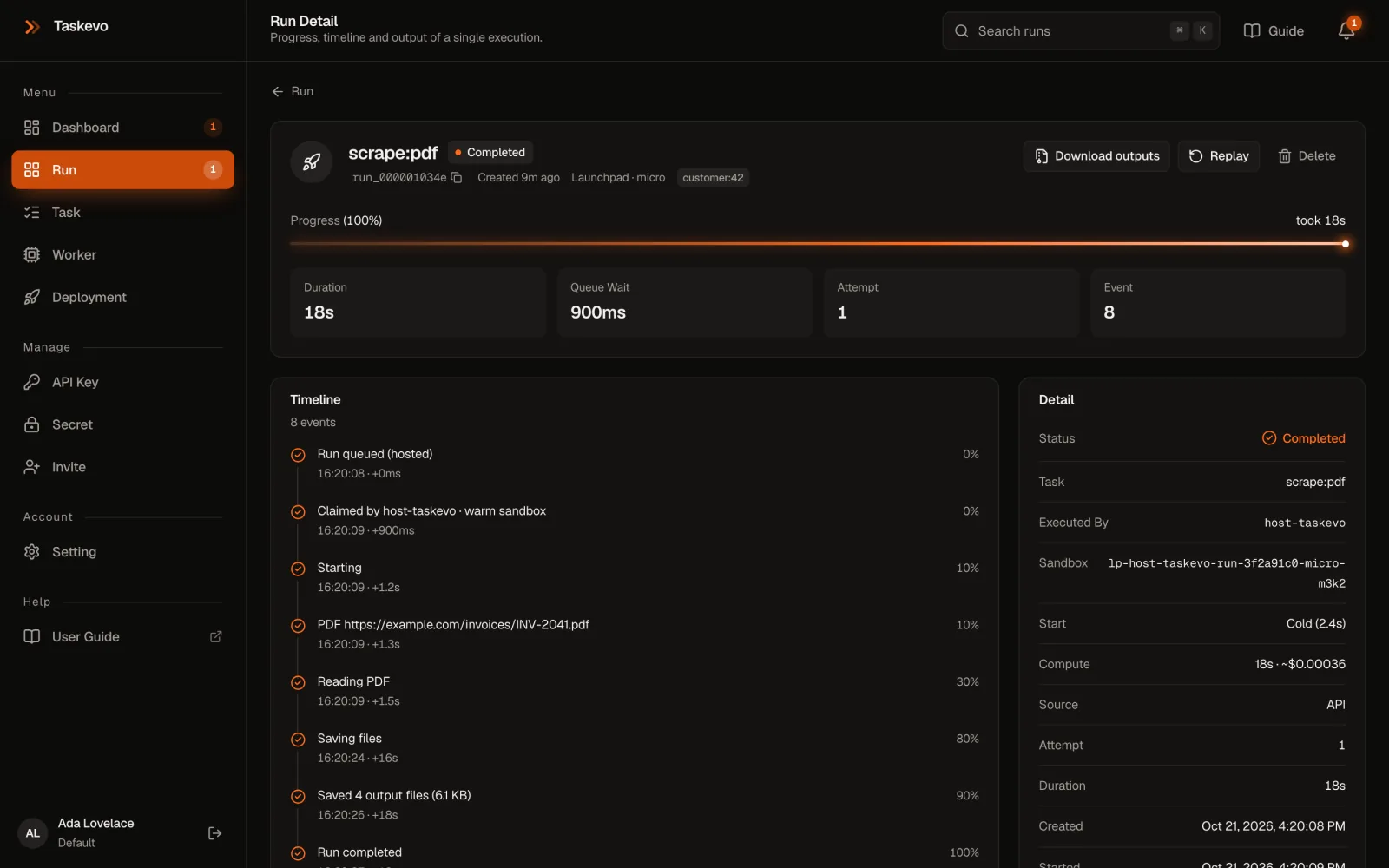
Write files to ctx.outputDir and they stay with the run for 30 days.
Download one from the run page, or all of them as a zip.

SDK and CLI
Everything the two npm packages do: taskevo-sdk in your code, taskevo-cli in your task projects.
taskevo-sdk
The client library for declaring tasks, triggering and reading runs, running workers and downloading files. No dependencies, TypeScript types included, and it runs in Node.js 20+, Bun, Deno and edge runtimes. File features need a filesystem: Node.js, Bun and Deno.
npm i taskevo-sdkIt exports task and isTask for task projects, the TaskevoSdk client, TaskevoSdkError, and createWorkerKeys / openSecrets for custom workers.
Safe by default. Plain http:// is refused except for localhost (allowInsecureHttp: true opts out on a private network) and redirects are never followed, so a key never leaves for another host. Pass fetch to use your own.
Trigger and read runs
| Method | Returns |
|---|---|
trigger(task, payload?, options?) | { id, run, idempotent } once queued. Options: idempotencyKey, tags, title |
retrieveRun(id) | { run, events }: status, progress, output or error, timeline |
listRuns({ status?, taskIdentifier?, limit? }) | { data }, newest first; limit 1–100, default 25 |
cancelRun(id) | { run }; the task's ctx.signal aborts |
waitForRun(id, { intervalMs?, timeoutMs?, onPoll? }) | The finished run. Polls every second; gives up after 10 minutes with 408 timeout |
triggerAndWait(task, payload?, options?) | The run's output; throws if it fails or is cancelled |
listRunFiles(id) | { files, totalBytes, expiredAt } |
import { TaskevoSdk, TaskevoSdkError } from "taskevo-sdk";
const tr = new TaskevoSdk({ baseUrl: process.env.TASKEVO_URL, apiKey: process.env.TASKEVO_API_KEY });

const { id } = await tr.trigger("report.monthly", { month: "2026-10" }, { idempotencyKey: "report-2026-10" });
const run = await tr.waitForRun(id, { timeoutMs: 30 * 60_000, onPoll: (r) => console.log(r.status, r.progress) });
if (run.status === "completed") console.log(run.output);

try {
  await tr.triggerAndWait("scrape:pdf", { url: "https://example.com/invoice.pdf" });
} catch (e) {
  if (e instanceof TaskevoSdkError) console.error(e.status, e.code, e.message);
}
Declare a task
task() checks the definition when the project loads, so a wrong machine size or secret name fails list, test and deploy straight away.
| Field | Default | |
|---|---|---|
id | required | What apps trigger: letters, digits and . _ : -, up to 100 |
run(payload, ctx) | required | The work; its JSON return value is the output |
secrets | [] | UPPER_SNAKE_CASE names, given in ctx.secrets |
machine | micro | micro 1 vCPU, 2 GiB · small 2, 4 · medium 4, 8 · large 8, 16 · xl 16, 32 |
maxDurationSec | 3600 | The run times out after this |
isolation | workspace | Reuse a warm sandbox, or run for a fresh one each time |
type Payload = { to: string; template: "welcome" | "reset" };
export const sendEmail = task<Payload, { messageId: string }>({
  id: "email.send", secrets: ["SMTP_PASSWORD"], maxDurationSec: 60,
  run: async ({ to, template }, { secrets }) => ({ messageId: "m-8812" }),
});
Run a worker
work(handlers, options?) starts the loop and returns stop(). Each handler gets (payload, ctx) with run, progress, signal, secrets, tmpDir and outputDir; a return completes the run and a throw fails it.
| Option | Default | |
|---|---|---|
concurrency | 1 | Runs this process executes at once |
workerId | random | The name on the Worker page and on each run |
pollIntervalMs | 2000 | How often an idle worker asks for work |
heartbeatIntervalMs | 10000 | Keeps it online and its runs claimed |
onError | console.error | Network and API errors; the loop keeps going |
meta | host, pid, runtime | Shown on the Worker page |
const stop = tr.work({
  "video.render": async (payload, { progress, signal, outputDir }) => {
    for (let i = 1; i <= 10; i++) {
      if (signal.aborted) return;                // cancelled
      await progress(i * 10, `Part ${i} of 10`);   // render into outputDir
    }
    return { parts: 10 };
  },
}, { workerId: "render-1", concurrency: 2 });

process.on("SIGTERM", stop);   // no new claims; running runs finish
Each process makes a one-time key pair in memory, and Taskevo encrypts each run's secrets to it: only that process can read them, only for that run, never on disk. A run whose worker goes quiet for 15 minutes is failed so it can't stay stuck. For custom loops, claim, progress, complete, fail, uploadRunFiles, heartbeat and openSecrets are the calls work() makes.
Errors
| Status | Code | Meaning |
|---|---|---|
| 400 | invalid_identifier, invalid_tags | Bad input; the message says which |
| 401 | unauthorized | Unknown or revoked key |
| 403 | forbidden_scope | Wrong key type for this call |
| 404 | not_found | No such run in this workspace |
| 408 | timeout | waitForRun gave up; the run carries on |
| 409 | run_finished | Cancelling a run that's already done |
| 413 | payload_too_large | Payload over 256 KB |
| 429 | rate_limited, queue_full | Slow down, or let the queue drain |
| 500 | run_failed, run_cancelled | From triggerAndWait: the run didn't complete |
taskevo-cli builds and ships task projects
Node.js 20.12+ and npm 7+. Install it in the project so everyone uses the same version, then run npx taskevo-cli --help for every option.
npm i -D taskevo-cli| Command | What it does | Needs |
|---|---|---|
init [dir] | Create a task project | nothing |
doctor [--offline] | Check toolchain, config, keys and connection | Deploy key |
list | Show the tasks it finds | nothing |
test [id] [payload] | Run one task once, locally | nothing |
dev | Be a worker for this project | Worker key |
deploy [--no-wait] | Upload a version, follow the build | Deploy key |
versions | Deployed versions; ● is current | Deploy key |
promote <version> | Make a ready version current | Deploy key |
readme | Refresh the README's Taskevo section | nothing |
Settings it reads
Your shell first, then ./.env. If TASKEVO_URL comes from the project's .env and points somewhere other than the usual host, it warns you: a cloned project could otherwise send your key elsewhere. Plain http:// is refused except for localhost (TASKEVO_ALLOW_HTTP=1 overrides).
init options
-y takes the defaults without asking; --ts or --js picks the language; --name, --task, --node 22 and --url answer the questions; --force rewrites scaffold files (never .env); --no-install skips npm install. Run in an existing project, it adds what's missing and keeps your files.
test and dev
test takes the payload as JSON or @payload.json, secrets from --secret NAME=value, the environment or .env (use test values: the command line lands in shell history), and --timeout. dev is a worker for task ids that aren't deployed.
What a deploy uploads
Compiled task files, package.json and package-lock.json. Never node_modules, .git or .env: the platform installs from the lockfile and secrets come from the Secret page. A version waiting for approval can't be promoted from the CLI.
Only in projects you trust. doctor, list, test, dev and deploy load the project's files, which runs their code on your machine. The CLI never prints keys and writes .env readable only by you.
# .env
TASKEVO_URL=https://www.taskevo.net
TASKEVO_DEPLOY_KEY=dp_live_…     # deploy, doctor, versions, promote
TASKEVO_API_KEY=wr_live_…        # dev: a Worker key
// taskevo-core.config.mjs (optional)
export default {
tasks: ["tasks"], // folders or files with task() exports
node: "22", // 20, 22 or 24
build: {
apt: ["ffmpeg"],
commands: ["npx playwright install --with-deps chromium"],
},
};$ npx taskevo-cli doctor
ok Node.js 22.12.0 the CLI needs 20.12+
ok npm 10.9.0
ok taskevo-sdk 1.2.0 bundled into each deploy
ok package-lock.json the sandbox installs exactly these
ok Taskevo reachable at https://www.taskevo.net
ok Deploy key works current version v3, 2 task(s)
$ npx taskevo-cli versions
● v3 ready 2 task(s) 21/10/2026, 04:20
v2 ready 1 task(s) 19/10/2026, 11:02
v1 failed 1 task(s) install dependencies failed (exit 1)
$ npx taskevo-cli promote 2# deploy from CI (GitHub Actions)
- run: npm ci
- run: npx taskevo-cli test
- run: npx taskevo-cli deploy
env:
TASKEVO_URL: https://www.taskevo.net
TASKEVO_DEPLOY_KEY: ${{ secrets.TASKEVO_DEPLOY_KEY }}
Settings and help
Your account, the workspace, the limits on hosted runs, and the fixes for problems people meet most.
Settings and hosting
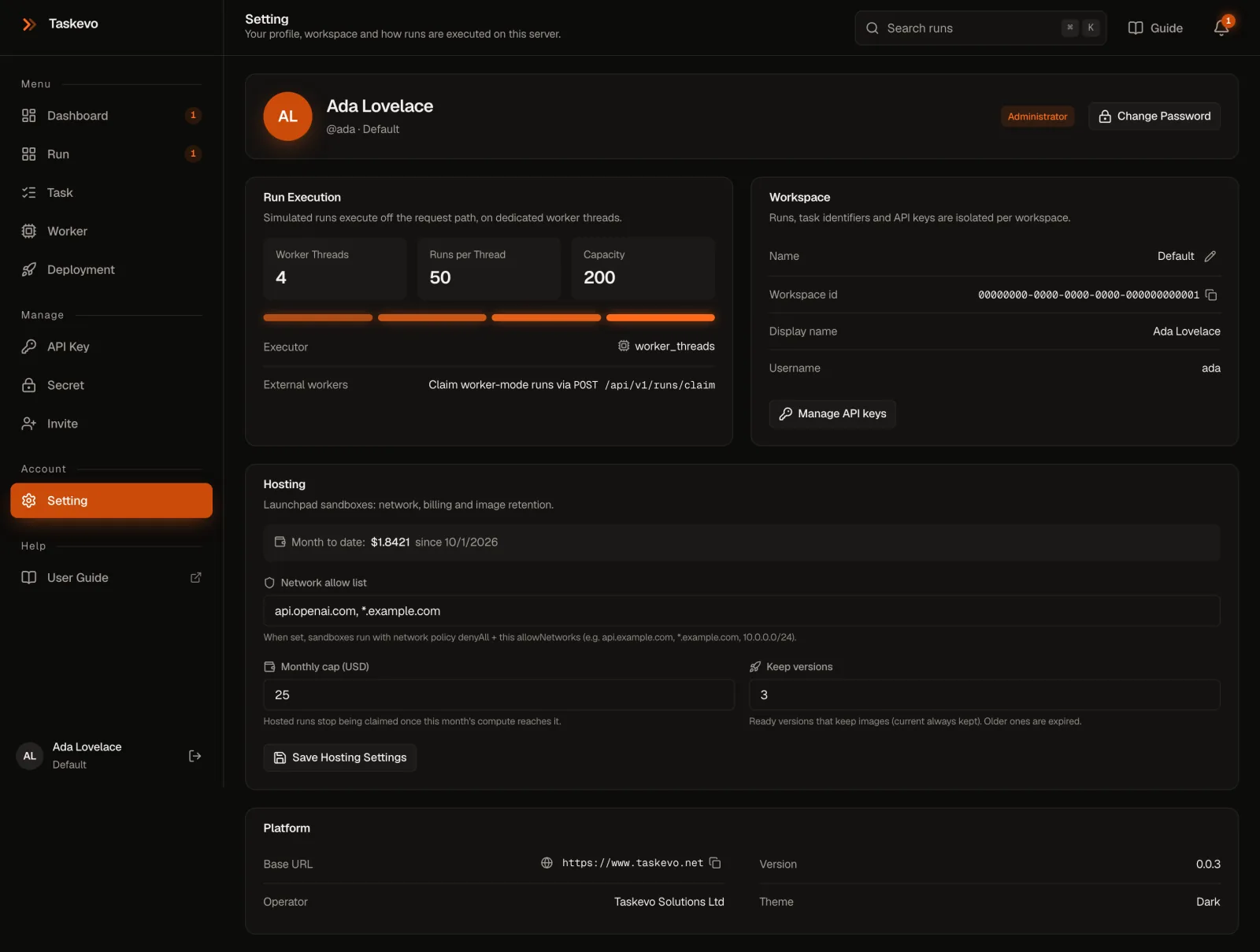
On Setting: Change Password (signs out your other sessions), rename the workspace with the pencil by its name, and copy the workspace id. Administrators also get Hosting:
- Network allow list: the hosts Launchpad sandboxes may reach, like
api.openai.com. Empty allows everything; a short list keeps task code from sending secrets anywhere else. - Monthly cap (USD): hosted runs stop starting once this month's compute reaches it.
- Keep versions: how many older ready versions keep their images for rollback.
When something goes wrong
401 Unauthorized
The key is wrong, has a typo or stray space, or was revoked. Create a new one on the API Key page.
403: "A … key can't do this"
Wrong key type.
deployneeds a Deploy key, triggering a Trigger key, a worker a Worker key.My run stays Queued
The task isn't deployed and no worker handles it. Check where it runs on the Task page, whether a worker with this task is online on the Worker page, or deploy it with
npx taskevo-cli deploy."… is not set" for a secret
Add the secret for this task on the Secret page. On Launchpad, also tick Also for hosted tasks. A worker must use a Worker key: other key types never receive secrets.
The build failed
Open the version's Build Log on the Deployment page. Native npm modules may need system packages in
build.apt, and a committedpackage-lock.jsonmakes the build install exactly your versions.My new version isn't live
If it says Needs Approval, open it on the Deployment page and click Approve & Make Current.
npx taskevo-cli versionsmarks the current version with ●.A run has no Files panel
The task wrote nothing to
ctx.outputDir, the version was deployed with a CLI older than 1.1, the worker runs an SDK older than 1.2, or 30 days have passed. The run's timeline says why files weren't saved."refusing to send the API key over plain http"
The SDK and CLI send keys over HTTPS only, except to localhost. Use your Taskevo's
https://address, or on a private network opt out withallowInsecureHttp: true(SDK) orTASKEVO_ALLOW_HTTP=1(CLI).Anything else
npx taskevo-cli doctorchecks your toolchain,.env, keys and connection and says what to fix. On a worker,npm run checkdoes the same.
Photo credits
The chapter photographs are archival pictures of the trades this guide borrows its ideas from; they show no Taskevo product, customer or team.
- Get started: Switchboard operators, 1958 by Seattle Municipal Archives from Seattle, WA, CC BY 2.0, via Wikimedia Commons. Shown in greyscale and darkened.
- Keys and secrets: Antique keys by Thomas Quine, CC BY 2.0, via Wikimedia Commons. Shown in greyscale and darkened.
- SDK and CLI: Lever frame in the Sourbrodt train station signal box (DSCF5829) by Trougnouf (Benoit Brummer), CC BY 4.0, via Wikimedia Commons. Shown in greyscale and darkened.
- Build and run tasks: Printing: men working at a printing press, proofing copy, in, CC BY 4.0, via Wikimedia Commons. Shown in greyscale and darkened.
- Get started: Orion & Oriola switchboard Elisa Telephone Museum by Antti Leppänen, CC BY 4.0, via Wikimedia Commons. Shown in greyscale and darkened.